Photo: PixieMe / Shutterstock.com
Google Doodles are artistic variations of the Google logo on the search engine’s homepage. These artistic variations of the Google logo celebrate historical events, holidays, and famous personalities. However, some Google Doodles are more than just images; they are games that can keep you entertained for hours.
In this article, we have listed the top 11 Google Doodle games that are interesting and will keep you entertained.
Also read: Top 7 games to play when bored on Google
Doodle Champion Island Games

The Doodle Champion Island Games is one of Google’s longest Doodle games, and it takes about two hours to finish. Originally, it was meant to be released with the 2020 Olympics, but the pandemic caused a delay. This extra time has allowed the Google Doodle team to make it even more enjoyable than planned.
You move your character around a map and face various challenges. Each game has different controls, so read the instructions carefully.
Play Doodle Champion Island Games here
Halloween 2016

Meow-loween is a Halloween-themed Google Doodle from 2016. In this game, you play as Momo, a cat, on a mission to protect the School of Magic from ghosts. The ghosts in the game have symbols above them.
To defeat them, you must use your mouse to draw the same symbol on the screen quickly. As you keep playing, more and more ghosts will show up.
Play Halloween 2016 here
Pac-Man (two-player)

On May 21, 2010, Google introduced this fun Doodle to celebrate Pac-Man’s 30th birthday. The game aims to clear each stage by eating all the dots while avoiding the ghosts. If a ghost catches Pac-Man, the game ends.
To move Pac-Man, use the arrow keys on your keyboard. If you want to play it with a friend, click Insert Coin twice, and Ms. Pac-Man will appear. You can control Ms Pac-Man with the keys to A, S, D, and W.
Play Pac-Man here
Garden Gnomes

In this game, you aim to launch gnomes from a catapult as far as possible in the garden. The gnomes plant more flowers the farther they go. To play, press the spacebar once to get the catapult ready and press it again to let the gnome fly.
Play Garden Gnomes here
Baseball

The Baseball Google Doodle came out on the Fourth of July in 2019. In this game, you control different foods you might enjoy at a baseball game, like hotdogs or steaks, and you face off against a team of peanuts.
In the game, a random food character steps up to bat. You press the Spacebar to swing your bat when the pitcher throws the ball.
Play Baseball here
Coding for Carrots

To celebrate 50 years of Kids Coding, the Google Doodle team introduced Coding for Carrots. It’s a simple game for kids to help them learn the fundamentals of coding through a drag-and-drop method.
Your task is to direct the rabbit to collect carrots by arranging blocks with arrows showing different directions. To advance to the next stage, arrange the blocks correctly to guide the rabbit to all the carrots on the platform.
Play Coding for Carrots
Pony Express
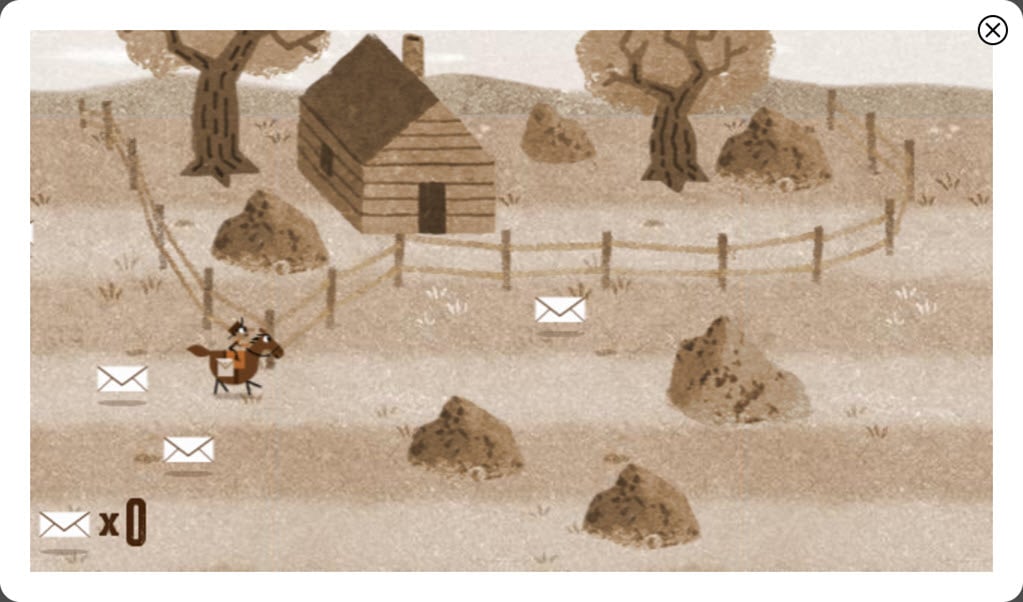
The Pony Express was a mail service in the 1800s, and it successfully started on April 14, 1860. In honour of this history, the Google Doodle team created a fun Pony Express game. In this game, you ride a horse to collect mail, but you must watch out for obstacles.
To play, use the up and down arrow keys to move your rider up and down.
Play Pony Express here
Loteria (two-player)

Loteria, sometimes called Mexican Bingo, is an old-fashioned card game from Mexico. In this game, someone displays a card, and you must check if you have a matching one. But unlike regular bingo, the shape you must create on your card changes every game.
This is the second Google Doodle that lets more than one person play together.
Play Loteria here
Crossword

This Doodle celebrates the 100th birthday of the crossword puzzle and its creator, Arthur Wynn. Google’s online version works just like the ones you find in newspapers. You type in answers, erase them, and try again until you solve it.
There are no hints, so if you need help, you’ll have to open another tab and use Google Search to find the answers.
Play Crossword here
Scoville

Wilbur Scoville invented a scale for measuring how spicy peppers are. To celebrate his 151st birthday, there’s a Scoville Doodle game where you can challenge a spicy pepper with scoops of ice cream.
At the bottom of the screen, there’s a bar with a moving circle. You aim to hit the pepper with ice cream by stopping the circle as close to the middle of the bar as possible.
Play Scoville here
Pangolin love

Pangolins are incredibly endangered due to poaching for their meat, use in traditional medicine, and the fashion industry. To highlight this critical issue, Google created a pangolin-themed Doodle on Valentine’s Day in 2017. This Doodle aims to spread love and awareness for these endangered creatures.
In the pangolin Google Doodle game, control the pangolin’s movement with the left and right arrow keys and make it jump using the spacebar.
Play Pangolin love here
Also read: Top 7 games to play on Chromebook at school