
Photo: Primakov / Shutterstock.com
If you have ever connected to a public WiFi network, you might encounter a service called ‘captiveportallogin’. Here, you are prompted to enter your information or accept some terms of service.
This is a common and important security feature on many websites. However, many people have apprehensions regarding this webpage and are wondering if it is spyware or not. In this article, we’ll explain captiveportallogin and why it appears on your device.
What is captiveportallogin on Android?
The com.captiveportallogin is a package file of the Captive Portal Login app. This app comes pre-installed on Android and helps the OS authenticate the WiFi network.
The app maintains the security of your Android OS when you connect to any public WiFi. The app first detects whether the WiFi network that you are trying to access has a captive portal page or not.
It does this by first sending an HTTP request to a known address and then checking whether the response is a redirect or a direct connection to the WiFi. If there is a redirect of the response, the WiFi network has a captive portal page, and you must sign it to access the network.
After the preliminary checks, the browser opens the captive login page, where you enter the information. Once you have been authenticated, the browser window closes, and you can access the internet.
Also read: What is KLMS agent?
Is captiveportallogin a spyware?
No, captiveportallogin isn’t spyware, nor it harms your Android device in any way.
It is a legitimate app and is a part of the Android OS. It neither collects your data nor sends the data to Google or other third-party platforms for collection.
You should not tamper or try to uninstall the app as it will affect your device’s security when you connect to WiFi.
Also read: What is “com.osp.app.signin”?
How to fix com.android.captiveportallogin has stopped error?
Sometimes, you may see a ‘com.android.captiveportallogin has stopped’ error on your device. It may be due to several reasons, such as:
- A bug or glitch in the Android OS.
- Corrupt or outdated OS.
- Conflict with other apps.
- Network problems.
Fix com.android.captiveportallogin has stopped error
Here’s how to fix this error:
Fix your internet connection
If your internet connection is slow or unstable, you may experience this error.
Head to this article to know what to do if the internet isn’t working.
Here’s an article on how to fix your WiFi.
Update Android
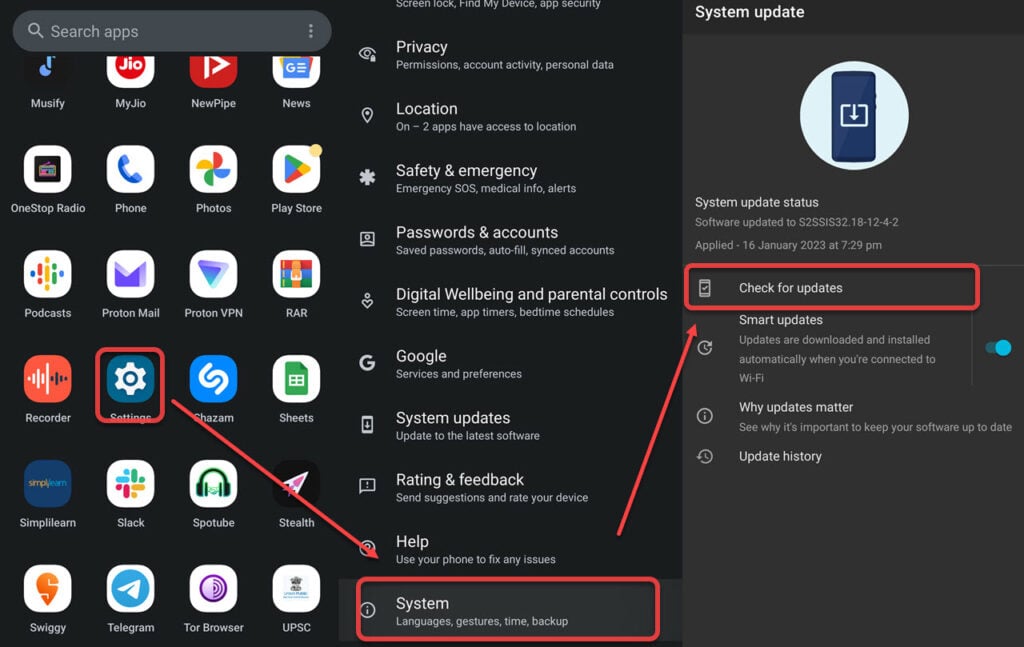
To update Android, follow the steps given below:
- Tap on Settings and then head to System.
- Now, tap on Check for updates.
If there are any updates available, tap on Update to install them.
You can also uninstall any conflicting app that is causing this error.
In conclusion, captiveportalloagin on Android is a system app that checks the captive login page before connecting to WiFi. The app is necessary for proper security and protection of your device.
Also read: What is “com.samsung.android.app.spage”?


