
Is your Getstreaming.tv not working smoothly? You can cast videos from other online streaming networks to your TV using this platform.
However, some people have reported having issues with this platform. In this article, we will give you certain troubleshooting tips to get back Getstreaming.tv running as before. But before that, let us understand the possible cause of why the platform isn’t working.
Why is Getstreaming.tv not working?
Here are some reasons why Getstreaming.tv is not working on your TV:
- Server-side issues: Sometimes, the servers are scheduled for maintenance or facing some repairs.
- Issues with your network: Is your internet network not working properly? If the answer is yes, then you will have problems casting on this website.
- Issues with your browser: Have you not updated your web browser recently? If so, some bugs or obstructions may disallow you to stream. Also, some browsers are better suited for the platform than others.
- Issues with your device: Some old mobile devices may not support the website or have other issues.
- Geographical issues: The website may be restricted in your country. If this is the case, you cannot use it.
Also read: How to fix Crunchyroll error P Dash 3?
How to fix Getstreaming.tv not working issue?
Now that we have understood the probable reasons why Getstreaming.tv is not working, let us head to troubleshooting each one of them:
Restart your device
Sometimes, the easiest solutions are the best ones. In this case, restart your device to clear any corrupt RAM.
After restarting, try using the website again and see if it works. If not, follow the next steps.
Check Getstreaming.tv servers
The first step you should take is to check Getstreaming.tv servers for possible outages.
Head to any third-party websites like Downdetector and then assess the server situation. If too many people have reported issues, you should wait for some time before signing back in.
Check your internet connection
A slow or unstable internet connection will cause problems streaming content on Getstreaming.tv. There can be many reasons why the internet may not be working, including an outage in your area, problems with your internet hardware, or other WiFi issues.
We have covered in detail what you should do if your internet isn’t working.
For troubleshooting WiFi issues, head to this article.
Also read: Fix: This PC can’t run Windows 11
Disable proxy server or VPN
If you’re using a proxy server or a VPN service to access Getstreaming.tv from a geo-restricted location, you may face problems operating the website as VPNs may not work well with this website.
To rectify this, you can change the VPN or find an alternate to Getstreaming.tv.
Fix your browser issues
Fixing your browser issues can help you a lot. Usually, this involves updating the browser or clearing the cache and cookies.
Update your browser
Updating your browser becomes necessary if you want to get rid of irritating bugs and other technical issues.
Here’s how you can update Google Chrome.
Similarly, click on the three-dot button to update Edge and then head to Help and feedback > About Microsoft Edge.

Clear browser cache and cookies
Clearing your browser’s cache and cookies will help deleting all the corrupt cache files that may be preventing the normal functioning of your browser.
Head to this article to learn how to clear the cache on Microsoft Edge.
To clear cache and cookies on Google Chrome, follow these steps:
Step 1: Click the three-dot button and head to More tools > Clear browsing data.
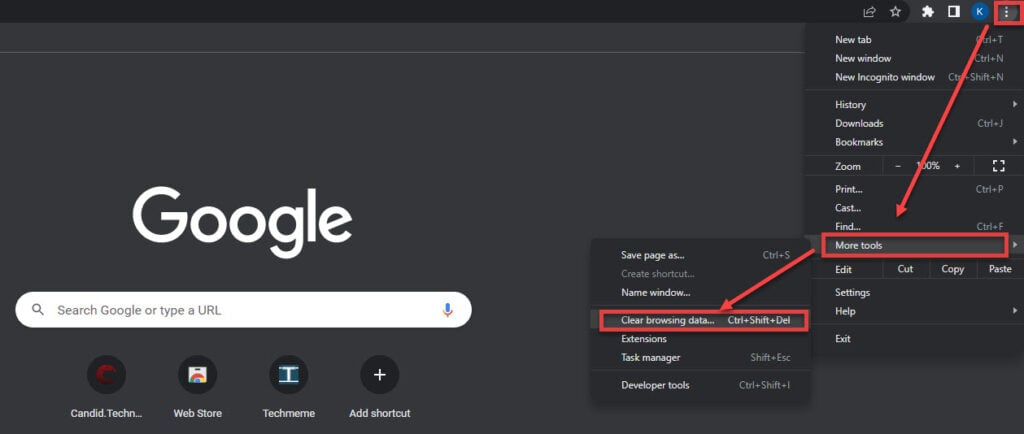
Step 2: Tick mark on Browsing history, Cookies and other site data, and Cached images and files. Select the time range to All time. Finally, click on Clear Data.

In conclusion, Getstreaming.tv not working issue can be easily solved by following the above steps.
Also read: How to fix Netflix error code C1 U7135 1957 205007?


