
Realsrv is a malicious software that can harm your computer if you’re not careful. It belongs to the category of browser hijackers, which means that this software can easily modify the browser’s settings without you knowing it.
Moreover, this software can also infiltrate adware in your browser and redirect you to other malicious websites. It is not a virus but damaging to your computer.
In this article, we’ll deal with Realsrv in more detail and explain how to remove it.
How does Realsrv work?
Realsrv is not as dangerous as other malware such as Trojan, spyware, or ransomware, but it is not entirely non-malicious.
It can slow down your browser, collect your browser data, including the websites you visit and passwords that you store, and expose you to other malicious content online with a constant barrage of adware.
When you install Realsrv, first, it will change your browser’s homepage, new tab settings, and search engine settings and can also redirect you to malicious web pages.
Moreover, it can also install toolbars, extensions or plugins without your knowledge, and these will collect and record your online activities.
The real purpose of Realsrv is to generate revenue for its developers by showing you adware, including pop-ups, links, banners, and fake alerts. If you’re not careful and click on these links unintentionally, you may get more ads and redirects.
Sometimes, these websites may also deceive you to download from these websites.
Also read: Do the Police investigate Identity Theft?
How does Realsrv enter into your device?
Realsrv enters into your device by a process known as software bundling. In this technique, malicious software is bundled together with other software that is important to you.
It usually happens when you install software from third-party websites that do not perform rigorous software testing.
In order to avoid such malicious software, you should always install it from their official websites or via the official app stores like those of Windows, Google and Apple.
You should also avoid clicking on suspicious links as they can download malware in the background without noticing it.
How to remove Realsrv?
In case you notice that there is something wrong with your browser and you’re seeing too many ads and pop-ups, there is a high probability that you are infected by Realsrv or such malware.
Here are some steps that you can take to remove Realsrv from your device:
Uninstall suspicious programs
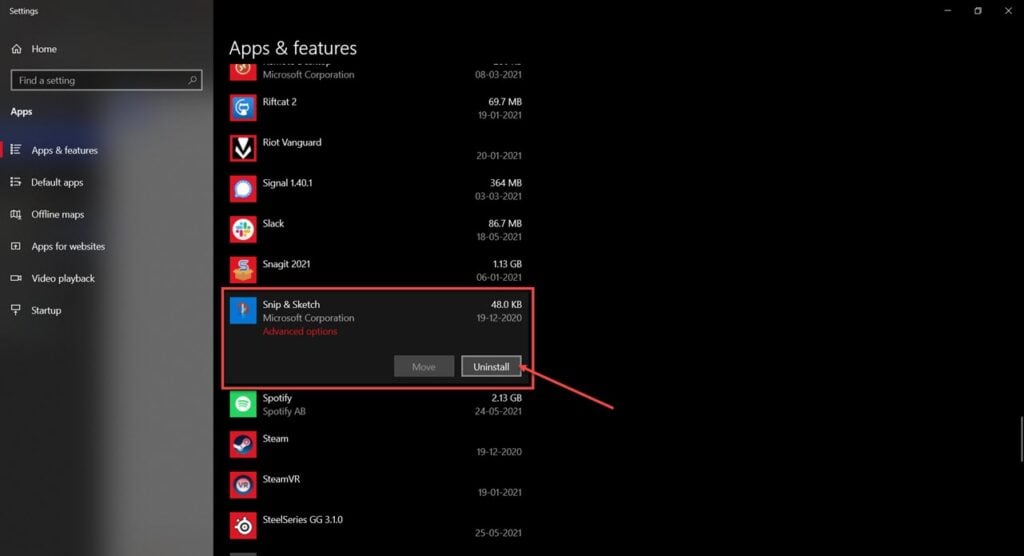
The very first step that you should take is to uninstall suspicious programs. Search for Add or Remove programs in the taskbar search bar, click on the three-dot button, and then select Uninstall.
Reset your browser
As these programs can tweak your browser’s settings to suit their nefarious agendas, you should reset your browser settings after removing these programs.
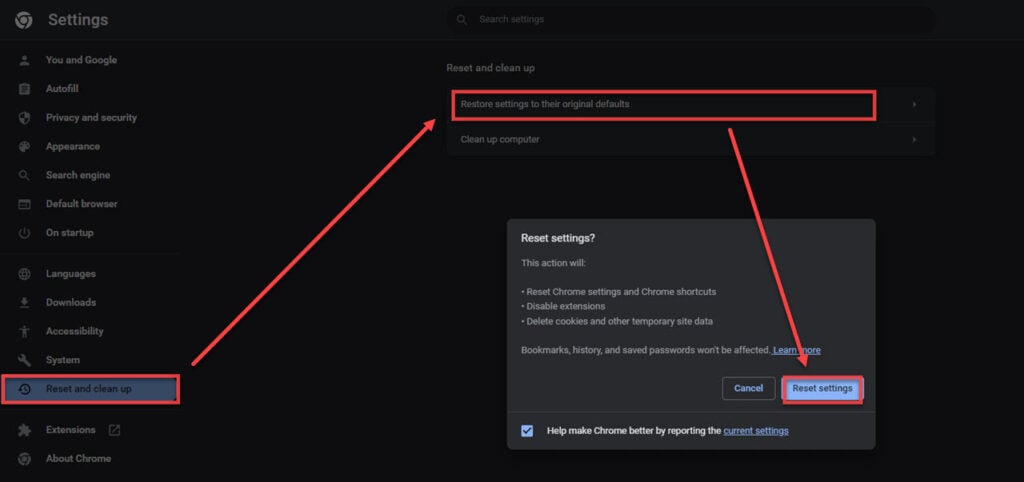
Here’s how to reset Chrome:
Step 1: Click on the three-dot button and then click on Settings.

Step 2: In Settings, select Reset and clean up from the left panel and then click on Restore settings to their original defaults. After that, click on Reset settings.
Delete plugins and extensions
As explained earlier, Realsrv may install unwanted plugins and extensions on your browser. So, you must uninstall them as soon as you have removed Realsrv.
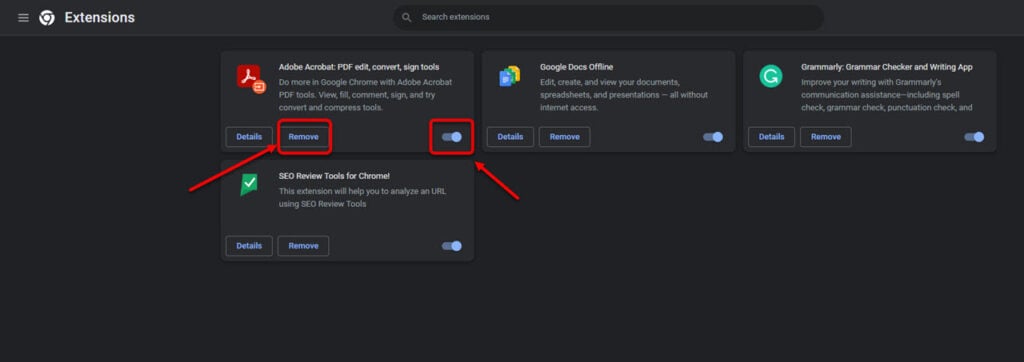
Here’s how to remove extensions in Google Chrome:
Step 1: Head to the three-dot button > More tools > Extensions.
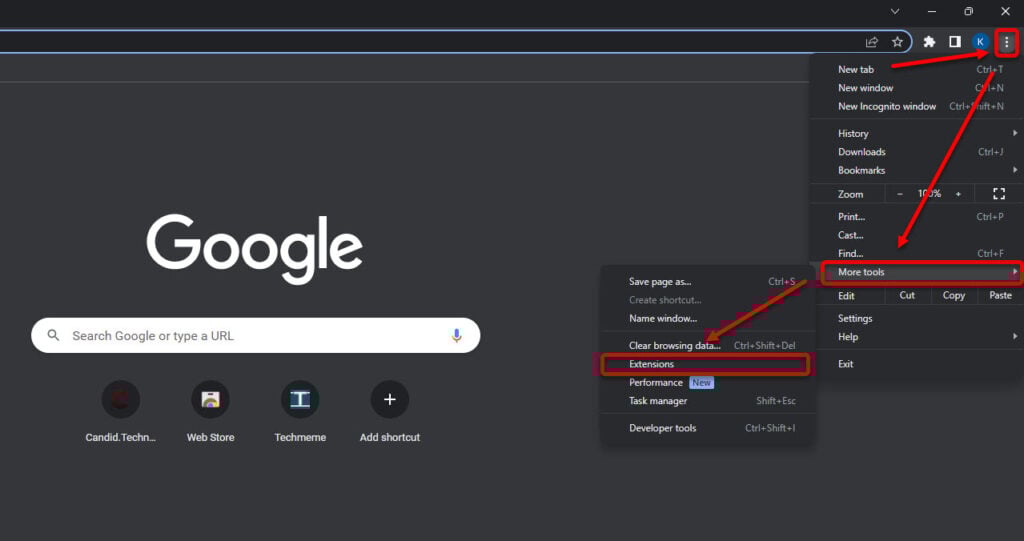
Step 2: Now, click Remove to permanently remove the extensions or turn off the toggle to disable it.
Scan your system
Use any reputable antivirus software to scan your system. These antiviruses will remove any remains of Realsrv from the system and clear any other malicious software you may have downloaded by mistake.
In conclusion, Realsrv, although not strictly a virus, can nonetheless harm your privacy and security. However, there are ways to remove it from your computer. Always download software from reputed online stores and avoid clicking on malicious links.
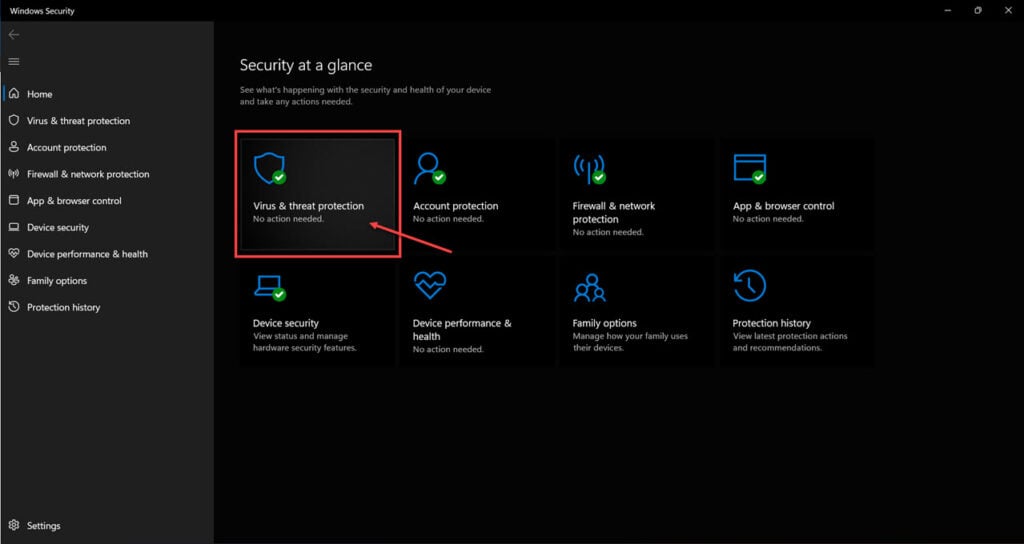
Windows also have an in-built antivirus software, Windows Defender, that can scan your computer for viruses.
Also read: Can you be hacked through Instagram DM?


