
With the rise of the digital age, establishing contacts with others has become easy with just a click of a button. But can a threat actor group spy on your phone through linked contacts? This question has been raised by many with no definite answer.
In this article, we’ll try to find out the answer to this question and will clear all your doubts regarding this issue.
What are linked contacts?
Before going further, let us understand the concept of linked contacts. As we all know, a person can have multiple contact information, including several emails, social media accounts, and mobile numbers.
When you sync all this information in one place, you create a linked contact. Now, you will have the comprehensive contact information of your linked contact.
Linked contacts can be achieved in both iOS and Android. To view linked contacts on Android, follow the steps given below:
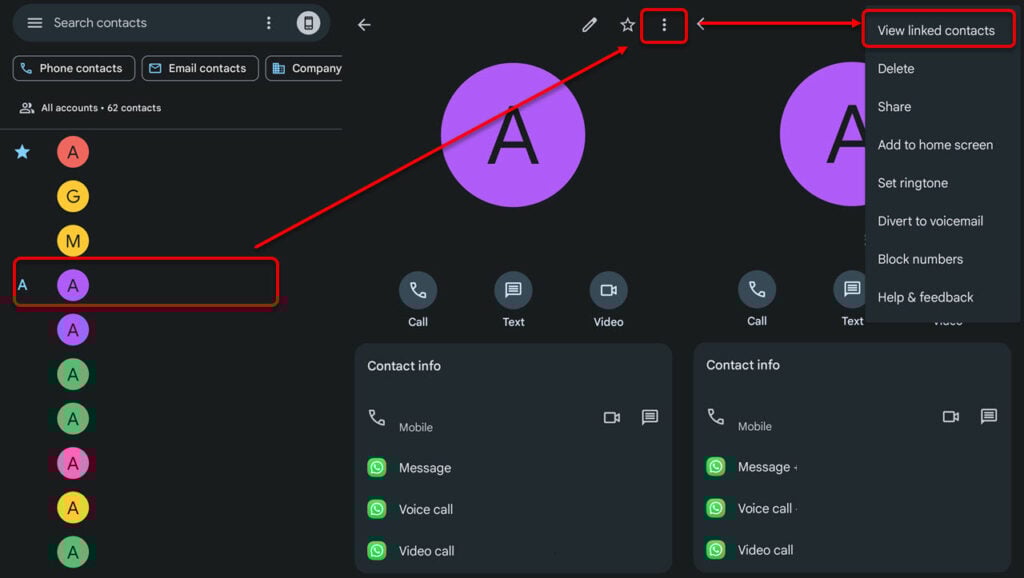
- Open your Contacts app and then select a contact.
- Next, tap the three-dot button at the top right and select View linked contacts.
All the contact information of that person will be shown to you. To unlink the details, tap Unlink after selecting View linked contacts.
Also read: Is System UI a spy app?
Can someone spy on your phone through linked contacts?
The answer to this question is not so straightforward.
If you have several contact information stored on someone else’s mobile phone and that phone gets hacked, the hackers can access your mobile numbers, emails and social media accounts. They can then use this newfound information to send malicious packages on your mobile that can be harmful if you’re not careful enough.
So, a hacker cannot directly influence your mobile phone with spyware just by knowing your linked contacts. However, they can stalk your social media profiles. So, private all your social media platforms and enforce two-factor authentication wherever possible.
To install spyware on your device, the hacker will send a link to download the malicious application. They can send the link on your social media platforms or directly contact you. You must be extremely careful in this situation and exercise caution while dealing with fraudsters.
In the next section, we will explain how to know if your phone has been infected by spyware and how to avoid risking it.
Also read: Is Config APK a spyware?
How to know if someone is spying on you?

There are a few tall tale signs that signify that your phone has been hacked and spyware has been planted.
These signs are as follows:
- High data usage: If you notice abnormal data usage on your phone, then chances are that spyware has been installed. Spyware continuously sends data back to the command and control servers maintained by the hackers. Thus, the a spike in data usage.
- Suspicious activities on your linked accounts: If you notice rather unusual activities on your linked accounts like spam calls, strangers sending friend requests or your social media platforms suddenly seeing a surge in followers, your spidey senses should tell that there’s something wrong.
- Faster battery drain: As spyware runs in the background and collects all your data, it drains the battery quickly. Always analyse the background apps on your mobile phone.
- Overheating: Are you facing overheating issues on your phone? You need to update your OS or should look out for spyware.
These indicators don’t necessarily guarantee that your phone has spyware, but if you have a few of these, the chances that your phone has been infected are highly likely.
Also read: How to figure out if your smartphone is being tapped?
How to prevent someone from spying on your phone?
Now that you have a good idea of the indicators of compromise let us understand the mitigation techniques:
- Strong passwords: You must develop a habit of creating strong passwords for all your online accounts. For more information, visit our article on how to create a strong password for your account.
- Activate two-factor authentication: Two-factor authentication adds another layer of security over the existing ones. Most platforms now have this option.
- Keep your phones and apps updated: Regularly updating your phones and apps will certainly lessen the chances of being hacked. Usually, hackers exploit app or OS vulnerabilities to further their nefarious agendas. To counter this, companies release security patches and updates.
- Never click on links: Hackers prompt you to click on dubious links in the garb of providing something valuable to you. This is one of the most common techniques deployed by the hackers. Always exercise caution when prompted to click on a link from an unknown source.
- Regularly scan your mobile phone: Install a reputable third-party antivirus and perform a scan of your device once in a while.
Using these best practices, you can secure your privacy in this increasingly online world.
In conclusion, linked contacts are useful, especially when you have people who have multiple online contact information. You can link all this information in a single place and can access it with ease. This saves time and also increases productivity. However, these linked contacts are a goldmine for hackers and scammers as they can get all the information in one place. So, protect your phone by following the best practices so that none of the information goes out.
Also read: How to find hidden spy apps on Android?


