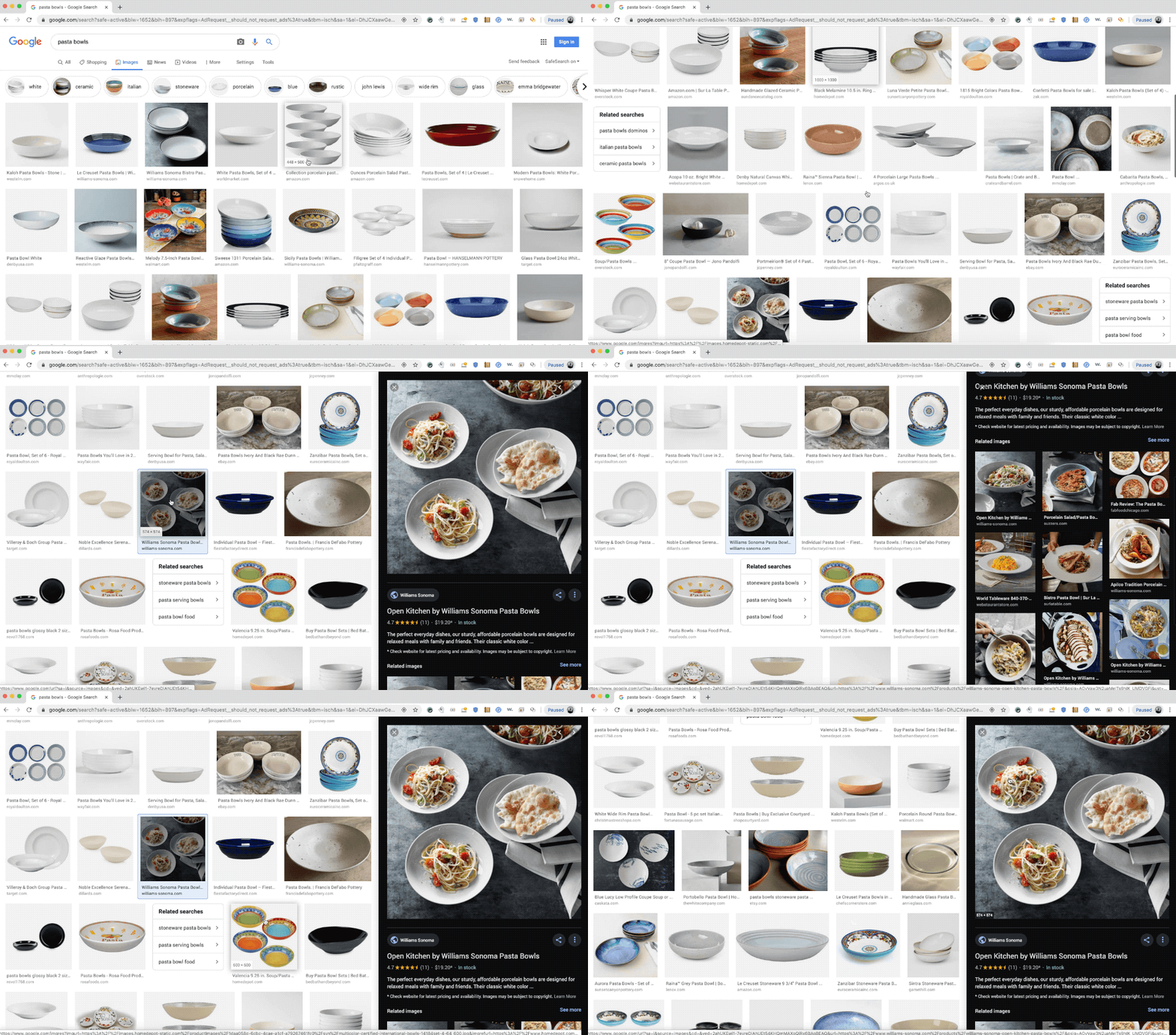
A new update has been rolled out for Google Images on desktop that changes the appearance of the image preview box, which now appears in a side panel instead of taking up the entire screen.
So now when users click on an image from the search results on Google Images, the selected image will appear in the side panel and the other images will still be visible on one side of the page. The preview stays there even when a user scrolls down the results page until it’s closed.
Users can also view previously opened image preview by clicking on the back button on the browser. The feature has been introduced to help users “easily compare images with others on the page” without losing track of the images they’ve viewed.
Selecting an image of a product for sale will show its price, brand, availability and reviews in the preview window. Captions for related images, which appear under the selected image in the preview, are also displayed.
“For retailers and publishers, this updated interface also means people are more likely to visit a web page to get information to help them with a task, or to buy a product on your site. Developers can learn more about how to make sure brand, price, rating and availability information appear on product images,” Mike Repass, Product Manager, Google Images, wrote in a blog post.
Also read: Gesture-based navigation through Android Q Beta updates: Boon or Bane?