Ordering pizza from Domino’s is often a convenient and delicious choice for many. However, there might be times when you need to cancel your order due to various reasons. Maybe your plans changed, or you realised you ordered the wrong items. Whatever the reason, cancelling your Domino’s order is a straightforward process.
Are you wondering how to cancel your Domino’s order? This article discusses two simple ways to do so.
Also read: Dominos app not working: Quick Fix
How to cancel Dominos order?
Domino’s allows a 60-second window after placing the order if you cancel the order within 60 seconds of placing the order then you will not be charged. Domino’s typically starts preparing orders soon after they’re placed. If you missed the window, Domino’s might charge you fully for the order. After the 60-second window, your only option to cancel the order is to contact Domino’s customer support. There are two ways to contact Domino’s customer care, and they are explained below:
Through Domino’s app
If you don’t mind being charged fully or you can convince Domino’s customer support to make an exception, then follow the steps below to cancel the Domino’s order from the Domino’s app:
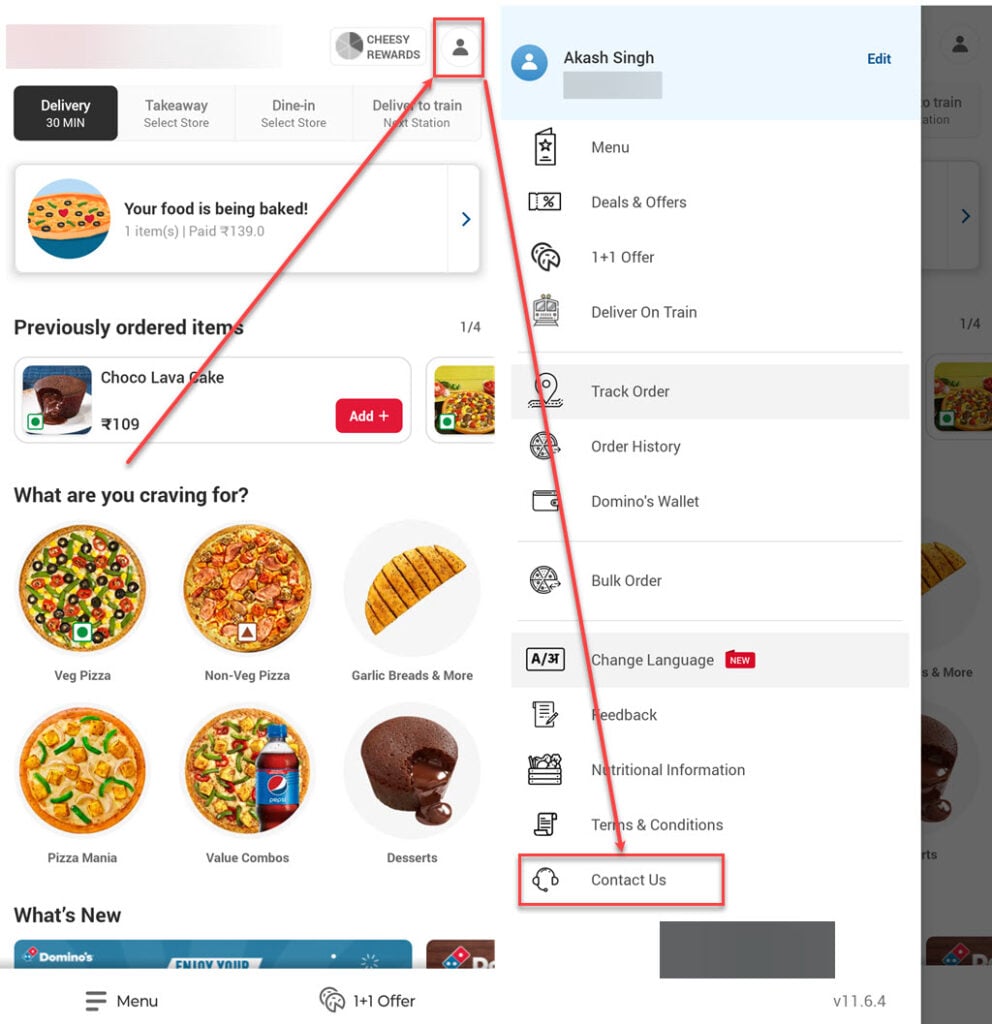
- Open the Domino’s app on your phone and tap the Profile icon at the top right corner of the screen.
- In the menu, tap on the Contact Us option. A virtual customer care executive bot will appear.
- Now, type Cancel My Order and send it.
Through customer care number
You can contact Domino’s customer support on 1800 208 1234 and ask them to cancel the order, they will ask you the reason and if they find the reason genuine they might not charge you fully for the order but might charge a small fee.
Also read: How to delete Domino’s account?