
Jio is one of India’s most widely subscribed internet service providers (ISP). However, users sometimes face problems with the internet, including unstable connections or no internet at all.
This situation can be quite frustrating especially if you are in a workflow that requires constant internet connectivity.
However, don’t worry, we are here to delve into the causes and fixes for this issue.
Possible reasons for the Jio internet not working properly
Let us understand the possible causes why the Jio internet is not working:
- Your data balance has expired.
- Cache issues.
- Hardware problems.
- Outdated OS.
- Server outages.
- SIM problems.
Also read: Why is Jio Cinema not working? Quick Fix
How to fix Jio internet now working issue?
Now that we have understood the possible reasons why the Jio internet isn’t working, let us delve into the fixes:
Restart your device
You should probably start by restarting your device to fix minor bugs or glitches in the operating system.
When you restart your device, the corrupt files that may be hindering important functionalities get flushed out and the RAM gets cleared.
Check data balance
The second step that you should take is to check your data balance. Sometimes, it happens that we forget the due date to recharge the data and the internet stops working.
Here’s how you can check the data balance in Jio:
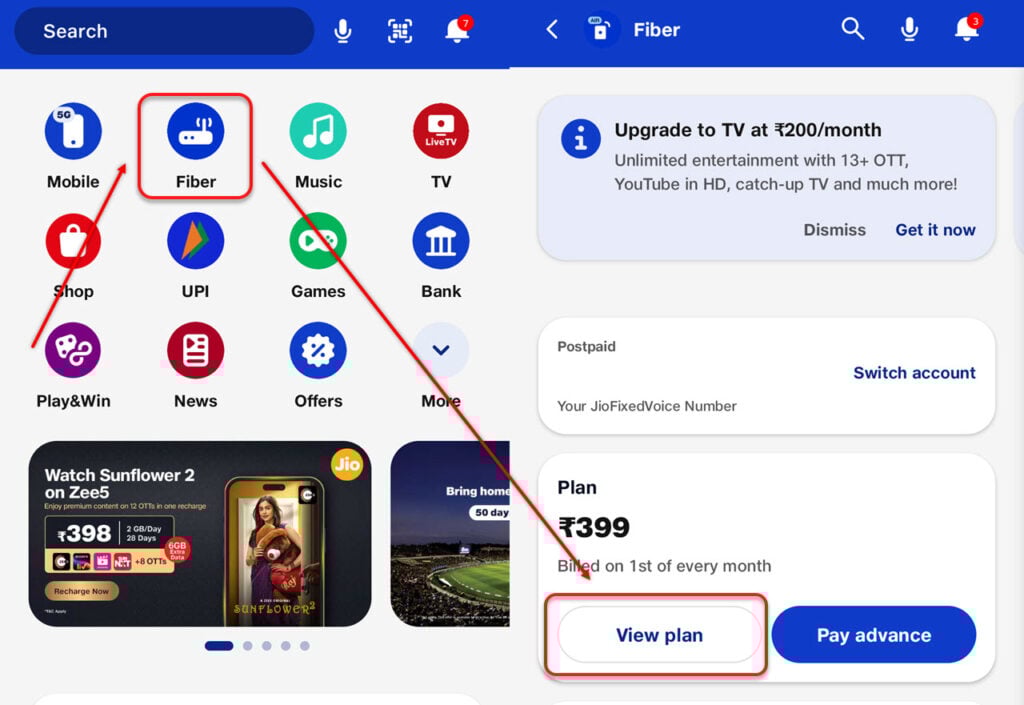
- Open the MyJio app and then select Fiber.
- Now, tap on View plan to see the data balance and the next data cycle.
Run diagnostics
The next step to fix the Jio internet issues is to run the diagnostics to assess the internet situation.

- Open the My Jio app and then tap on Fiber. Next, tap on Run diagnostics.
- Now, tap on Internet connectivity and then tap on the Run diagnostics button at the bottom.
If any issue has been detected, tap on Fix now.
Fix the hardware issues
Sometimes, the internet hardware is the root cause of the problem. This hardware includes a router or modem along with ports and cables.
Check each one of these for physical damage and replace them if you find one.
For more information, head to our article on what to do if the internet isn’t working.
For WiFi issues, head to our article on what to do if the WiFi isn’t working.
Update device OS
Sometimes, outdated device OS can also cause the Jio internet to not work properly.
Here’s how to update Android OS:

- Head to Settings and then tap on System updates.
- Next, tap on Check for updates.
Check your SIM card

Sometimes, the Jio SIM card can showcase physical damage or other problems, causing various disruptions including problems with the Jio internet.
Remove your SIM card and then check for any signs of physical damage. If you found one, order the replacement.
Another fix that you can try is to learn the SIM tray to remove any dirt or grime. Furthermore, use only the SIM tray opening device that you receive from the manufacturer to perform SIM tray operations.
In conclusion, if your Jio internet is not working on your device, it could be due to several factors such as server outage, hardware issues, outdated device OS, or expired data plan. Follow the instructions that we have provided above to fix the issue easily.
Also read: How to fix JioCinema network error?


