
If you’ve observed an unexpected increase in intrusive advertisements and pop-ups while browsing on your Mac, your device has likely been compromised by Pipidae or any other adware. This sneaky adware can disrupt your online experience and even pose security risks.
This article discusses Pipidae, what it does, how it is installed on your Mac, and methods for removing it.
Below we have discussed:
What is Pipidae?
Pipidae is a type of adware that targets Mac computers. Adware isn’t technically malware, but it’s an unwanted program that disrupts your browsing experience by bombarding you with ads and potentially redirecting you to unsafe websites.
Also read: What is GeneralObject.gqa? How to remove it from Mac?
What does Pipidae do?
Pipidae typically infects your Mac by bundling itself with legitimate software you download online. Once installed, Pipidae generates intrusive advertisements, pop-ups, and banners. These ads can be disruptive, and clicking on them might lead to dubious websites that could steal your personal information or infect your device with further malware.
Signs of Pipidae infection
- An increase in intrusive advertisements across websites you visit.
- Unexpected redirects to unfamiliar or potentially risky websites.
- New browser extensions or toolbars are installed without your knowledge.
- Slow browser performance and frequent crashes.
How did it get installed on your Mac?
There are a few different ways it can get installed on your Mac, and they are mentioned below:
- Bundled software: Free software downloads might include Pipidae as an unwanted extra.
- Malicious websites: Clicking bad ads or visiting untrusted websites can install Pipidae.
- Fake updates: Pop-ups urging you to update software from unofficial sources can be a disguise for Pipidae.
How to remove it?
Here are a few methods to help you remove the Pipidae from your Mac:
Use an anti-malware
Several anti-malware programs designed specifically for Macs can detect and eradicate Pipidae. Opt for reputable options with a strong track record, such as Malwarebytes for Mac or Combo Cleaner. These programs can thoroughly scan your system, identify Pipidae and any other lurking threats, and remove them efficiently.
Quit the suspicious processes
You can look for any suspicious processes in the Activity monitor and if you find any, close it. Here’s how you can do it:
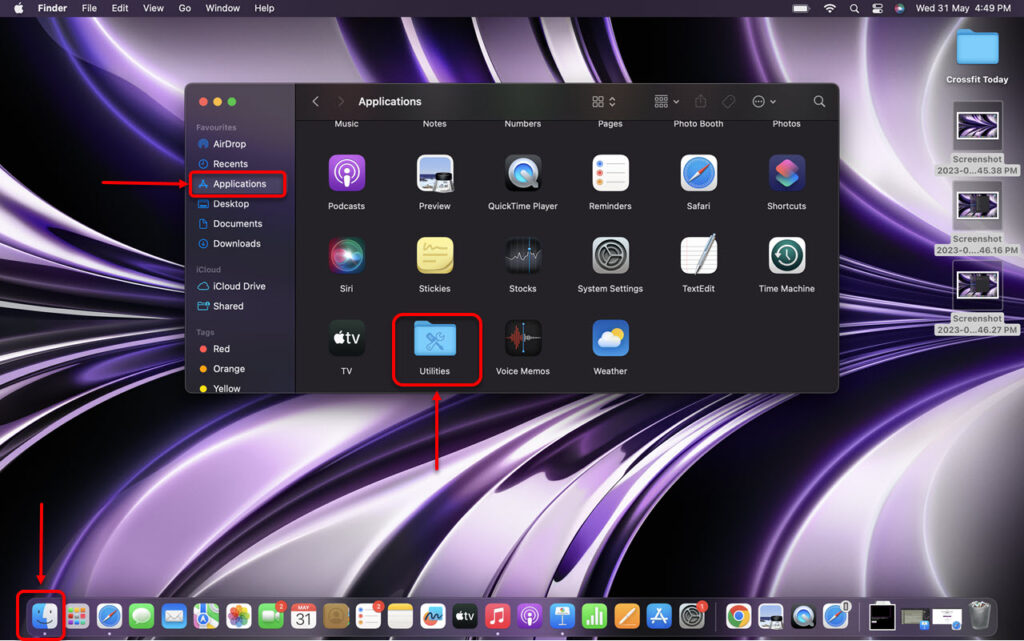
Step 1: Go to Finder, click on Applications and then click on Utilities.
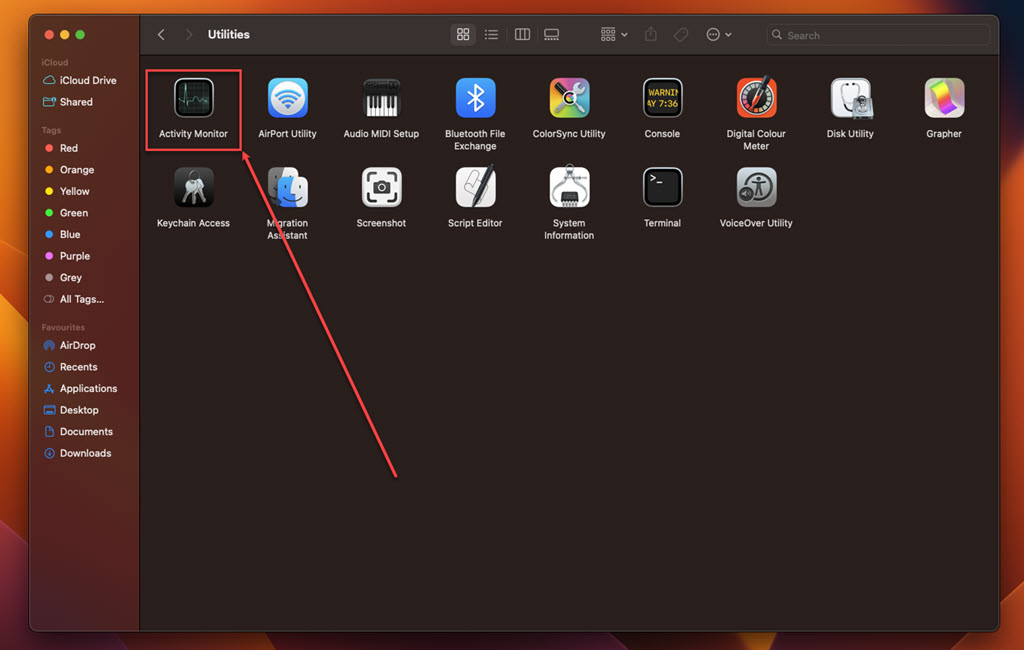
Step 2: In Utilities, run the Activity Monitor.
Step 3: In the Activity Monitor, click on the Memory tab.
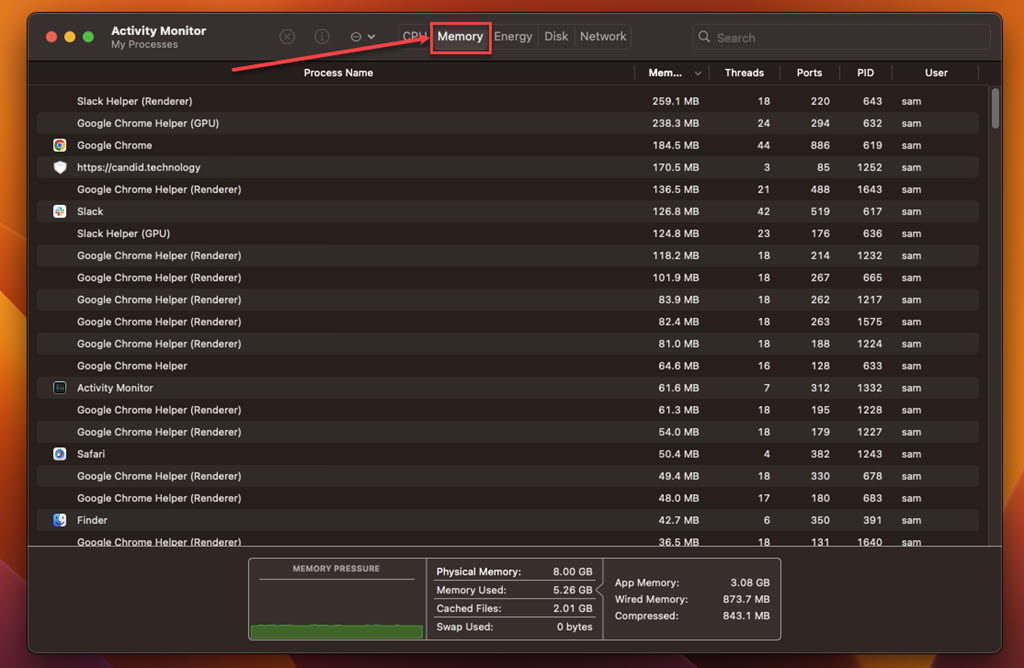
Step 4: Look for suspicious processes, select them, click on the Cross at the top and then click on the Force Quit.
Also read: How to delete your Slick account?
Remove the suspicious apps
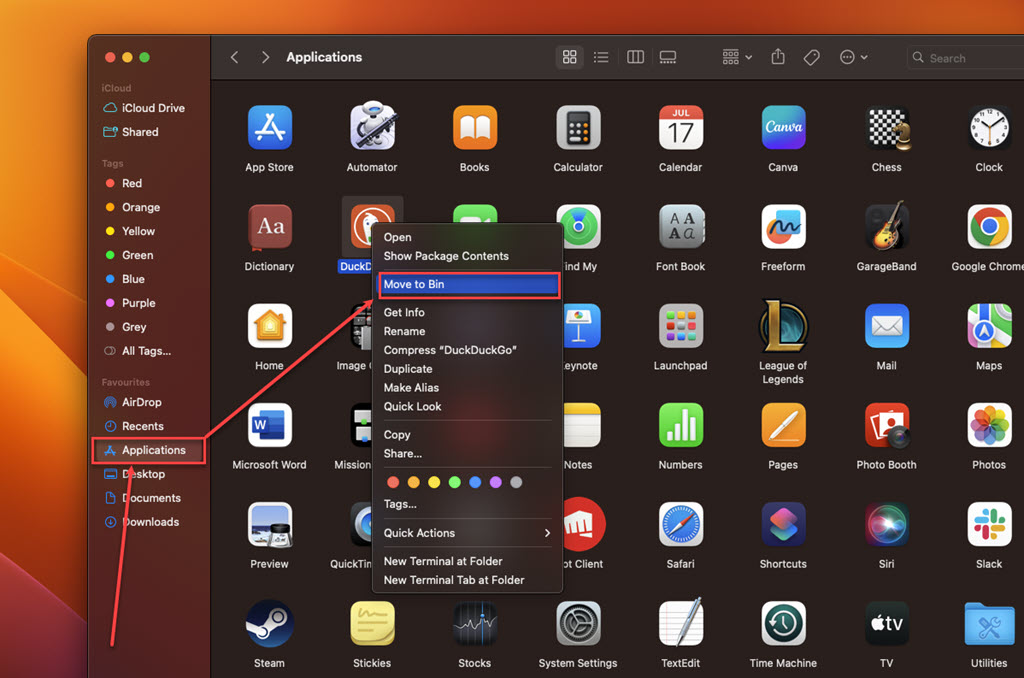
Check your Applications folder for any suspicious apps you don’t remember installing or apps that you have recently downloaded from any untrusted source:
Step: Go to Finder, click on the Applications option in the sidebar, right-click on the suspicious app, and then click the Move to Bin option in the dropdown menu.
Remove the suspicious extension from your browser
Safari
Step 1: Open the Safari browser, click on Safari, and then, in the dropdown menu, click on the Settings option.

Step 2: Click the Extensions tab, select the Extension you want to remove, and then click Uninstall.

Chrome
Step 1: Click on the Triple-dot menu. In the dropdown menu, hover over Extensions and then click Manage Extensions.

Step 2: Click the Remove button under the extension you want to remove in the Extensions.

Firefox
Step 1: Click on the Menu (triple horizontal bars) icon, and then in the dropdown menu, click on the Addons and themes option.

Step 2: Click on the triple horizontal dots icon beside the extension you want to remove, and then, in the dropdown menu, click Remove.

By following these comprehensive steps, you should be able to successfully remove Pipidae from your Mac and reclaim a browsing experience free from intrusive ads and their potential security threats.
Also read: What is ValidBoostfld? How to remove it from Mac?


