
With the increasing use of caller identification apps like Truecaller, maintaining control over your personal information is more important than ever. While Truecaller offers convenience by identifying incoming calls, it also exposes your last seen status, potentially compromising your privacy.
This article discusses what is last seen and how to remove last seen from Truecaller in simple and easy steps.
What is last seen on Truecaller?
The last seen feature in Truecaller indicates the most recent time someone used the Truecaller app. It’s determined by the last time the person had their phone connected to the internet and the Truecaller app open. Truecaller logs your last seen time whenever you actively open the app or when the caller ID banner appears during phone calls. However, this information isn’t recorded if your device is offline and not connected to the internet.
Also read: How to record a call in Truecaller?
How to remove the last seen on Truecaller?
Truecaller allows its user to turn off their last seen status. It is a simple process and here are the steps to to do that:
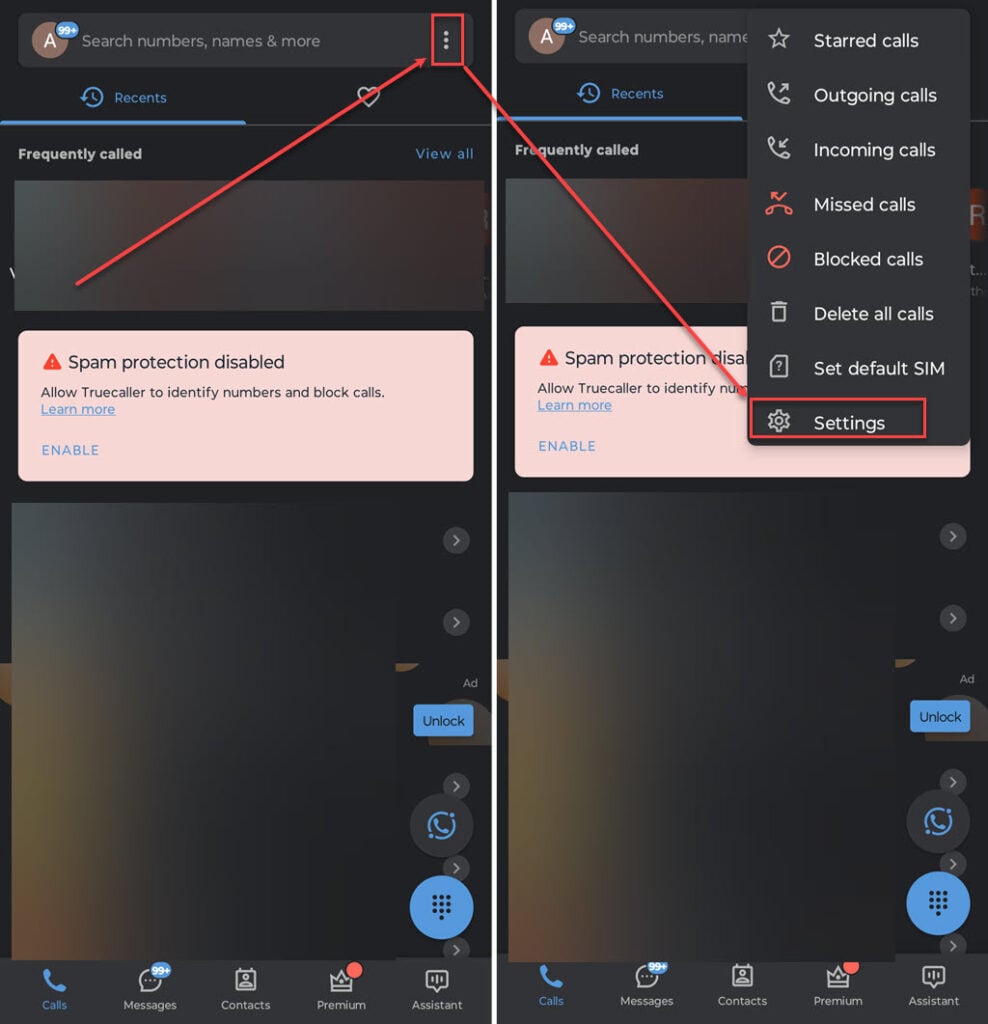
- Open the Truecaller app on your phone and tap on the Triple dots icon available at the top right corner of the screen.
- In the dropdown menu, tap on the Settings option.
- On the Settings page, tap on the Privacy Center option.
- Now, turn the toggle off beside the Availability option.
FAQs
Is Truecaller’s last seen accurate?
The accuracy of the last seen status on Truecaller can vary because it relies on factors such as background app usage, permissions for caller ID, internet connection, and more.
Can you see the last seen of other users if you have disabled yours on Truecaller?
If you’ve turned off the last seen feature for your profile on Truecaller, you cannot view the last seen status of other users.
Also read: How to remove Truecaller as the default calling or SMS app?





