
Photo: Farknot Architect / Shutterstock.com
Have you noticed your web browser acting oddly lately? Perhaps it’s redirecting you to unfamiliar websites, bombarding you with unwanted ads, or even hijacking your search results. If so, you might be dealing with a malicious browser hijacker called StandartProductFld.
This article discusses StandartProductFld, the signs that your Mac is infected by it, how it gets in your Mac, and how to remove it.
Below we have discussed:
Also read: What does “NBP will damage your computer” mean?
What is StandartProductFld?
StandartProductFld is categorised as an adware or potentially unwanted program (PUP). It typically enters a system bundled with freeware or shareware downloads or through deceptive advertising techniques. Once installed, it integrates into the web browser (commonly Google Chrome, Mozilla Firefox, or Microsoft Edge), displaying intrusive advertisements, modifying browser settings, and tracking user browsing habits.
The main purpose of StandartProductFld is to generate revenue for its developers through various means, such as pay-per-click advertising, affiliate marketing, and collecting user data for targeted advertising. While not inherently malicious, its presence can significantly degrade the browsing experience and compromise user privacy.
Signs of StandartProductFld infection
Identifying StandartProductFld on your system might be difficult because it often hides behind different names or disguises itself within seemingly legitimate software installations. However, some common signs of its presence include:
- Unwanted advertisements: You may notice an influx of pop-up ads, banners, in-text ads, or sponsored links appearing on websites you visit, even on pages they wouldn’t normally display.
- Browser redirects: StandartProductFld may redirect your browser to unfamiliar websites or pages you didn’t intend to visit.
- Changes in browser settings: Your browser’s homepage, default search engine, or new tab page may be modified without your consent.
- Sluggish performance: Your browser or computer may experience sluggishness or slowdowns due to the resources consumed by the adware.
How did StandartProductFld infiltrate your Mac?
StandartProductFld typically infiltrates Mac systems through deceptive means, such as:
- Software bundling: It often piggybacks on installing other software, especially free or pirated applications downloaded from untrustworthy sources. Users may unknowingly agree to install StandartProductFld alongwith the desired software without paying attention to the installation process.
- Deceptive ads: Users might encounter misleading advertisements claiming to offer useful software or updates. If you click on these ads, you could unintentionally install StandartProductFld or other adware.
- Fake software updates: StandartProductFld may also disguise itself as a legitimate software update prompt. Users who fall for these fake updates unknowingly install the adware on their system.
Also read: What is XProtect on your Mac?
How to remove it?
Removing StandartProductFld from your system involves several steps to ensure a thorough cleanup and prevent its reappearance.
Scan with Antivirus software
Download and run a reputable anti-malware program like Malwarebytes for Mac to scan your system for any lingering malicious files associated with StandartProductFld.
Quit the suspicious processes
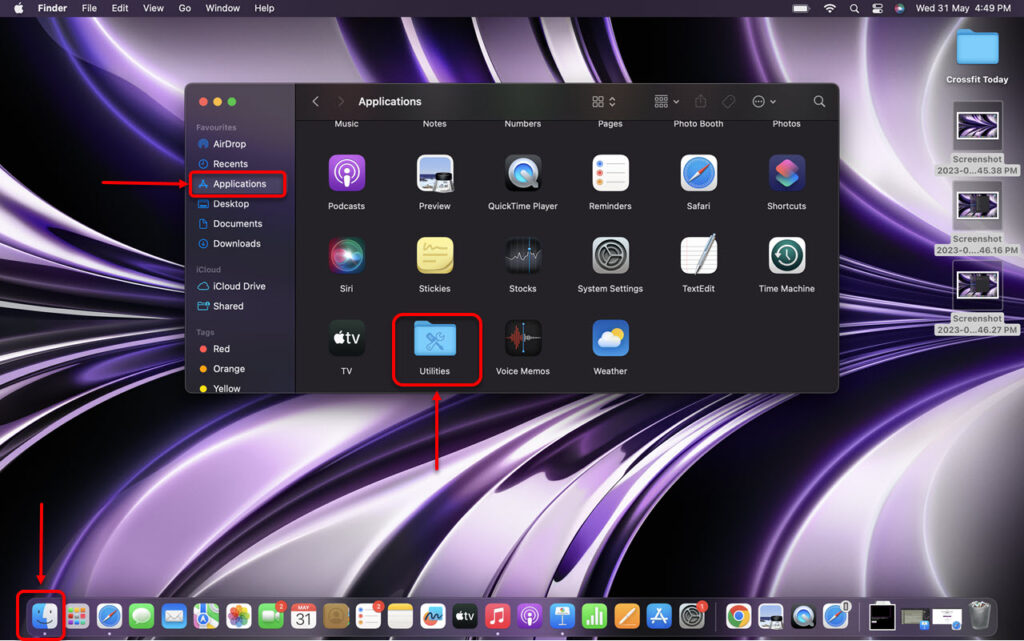
Check the Activity Monitor for any suspicious process running on your Mac, if you find any close it. Here are the steps:
Step 1: Go to Finder, click on Applications and then click on Utilities.
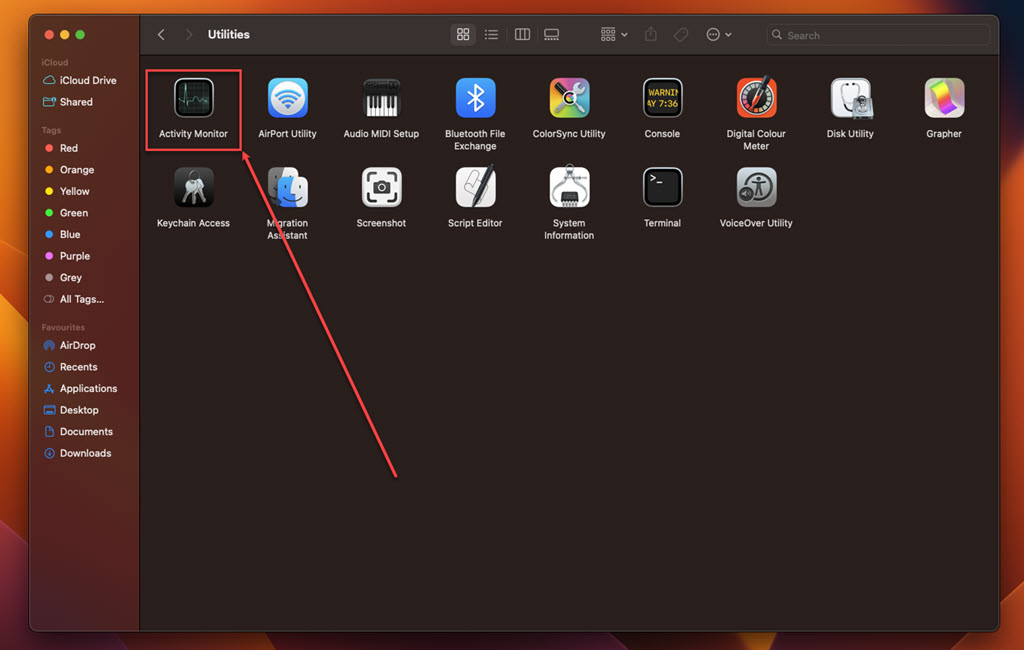
Step 2: In Utilities, run the Activity Monitor.
Step 3: In the Activity Monitor, click on the Memory tab.
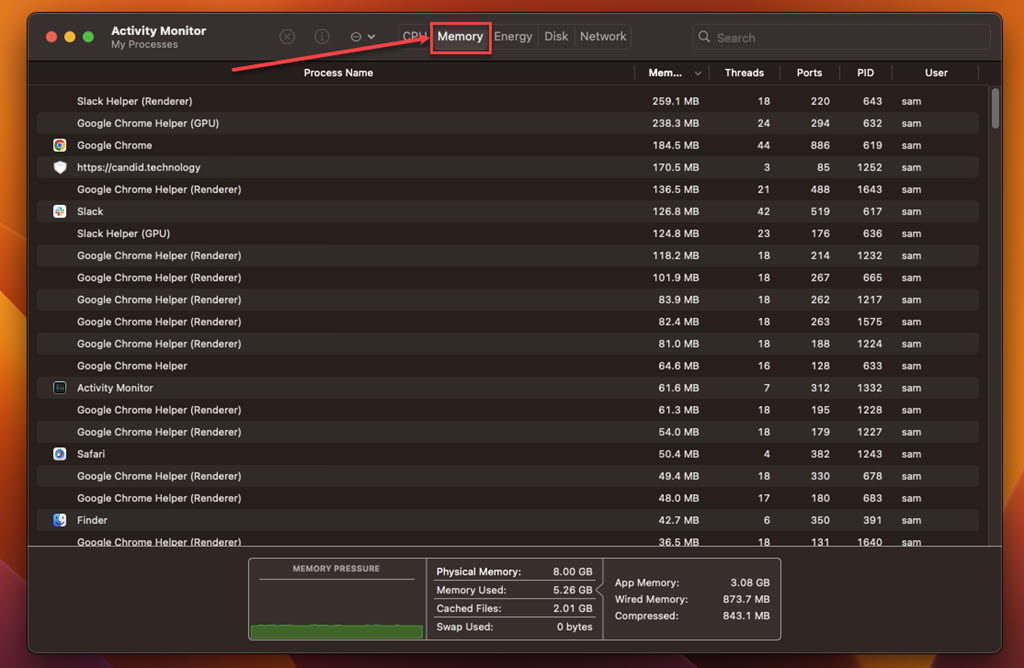
Step 4: Look for suspicious processes, select them, click on the Cross at the top and then click on the Force Quit.
Also read: What is AssistiveRecord.gqa on your Mac? How to remove it?
Uninstall suspicious apps
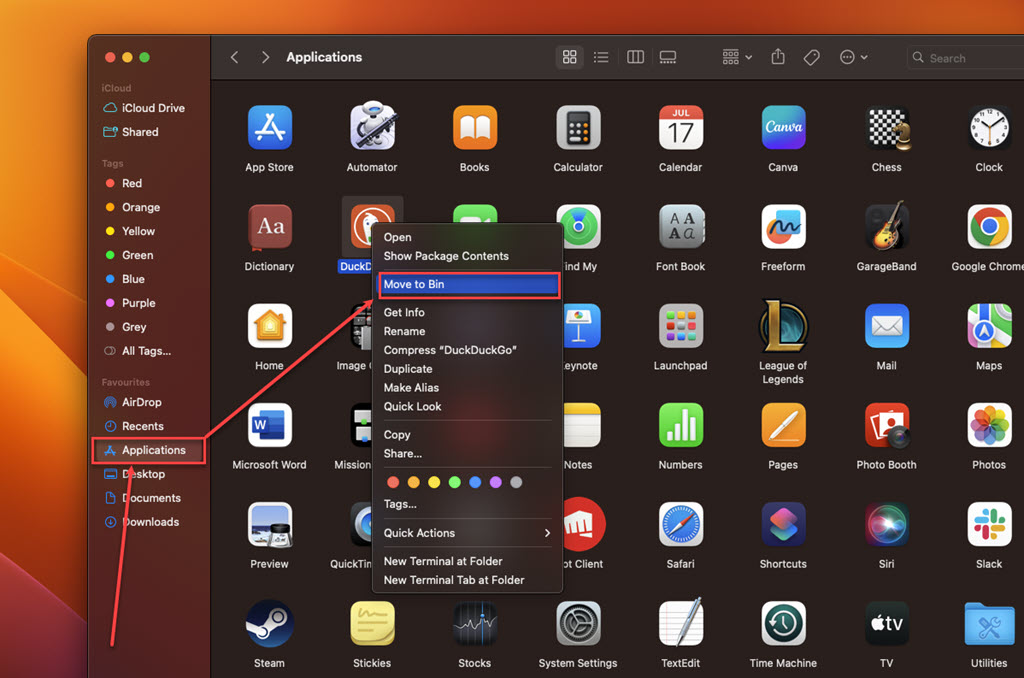
Check your Mac’s list of installed applications for suspicious apps, particularly those you recently downloaded from untrusted sources. Here’s how to do it:
Step: Go to Finder, click on the Applications option in the sidebar, right-click on the suspicious app, and then click on the Move to Bin option in the dropdown menu.
Remove the suspicious extension from your browser
Safari
Step 1: Open the Safari browser, click on Safari, and then, in the dropdown menu, click on the Settings option.
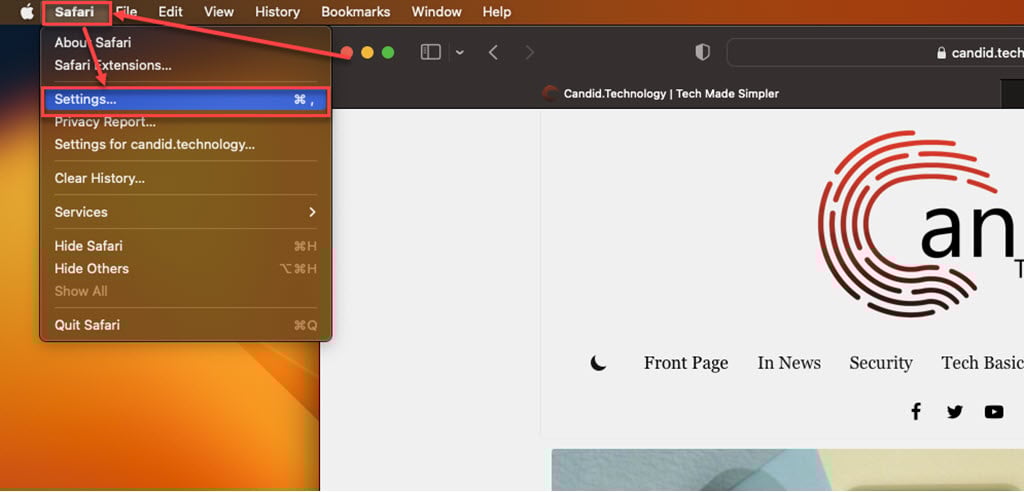
Step 2: Click the Extensions tab, select the Extension you want to remove, and then click Uninstall.

Chrome
Step 1: Click on the Triple-dot menu. In the dropdown menu, hover over Extensions and then click Manage Extensions.
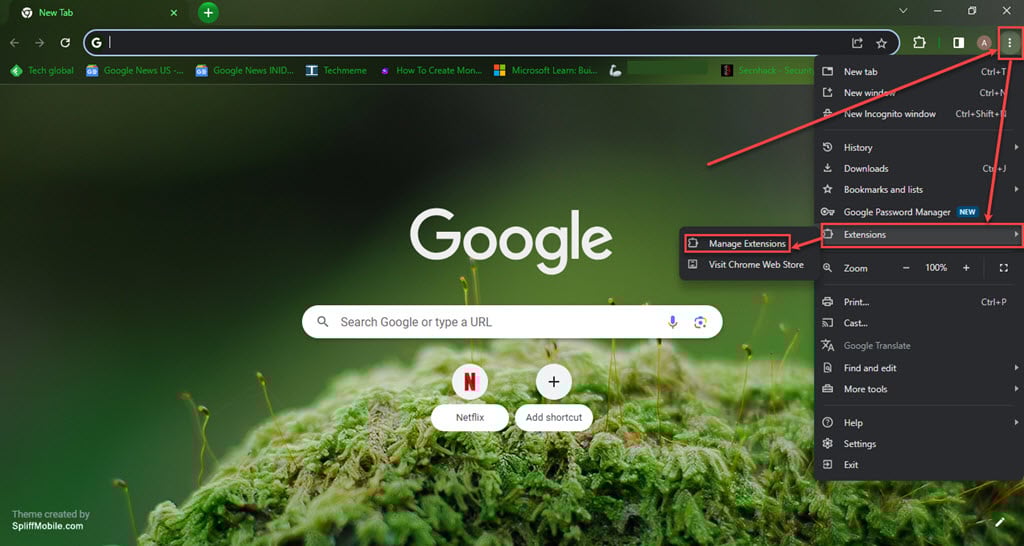
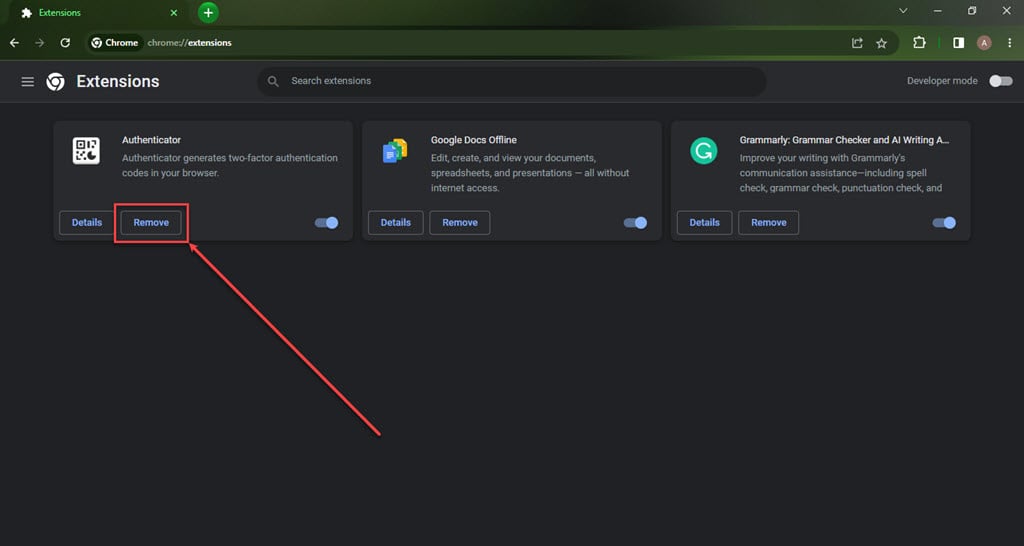
Step 2: Click the Remove button under the extension you want to remove in the Extensions.
Firefox
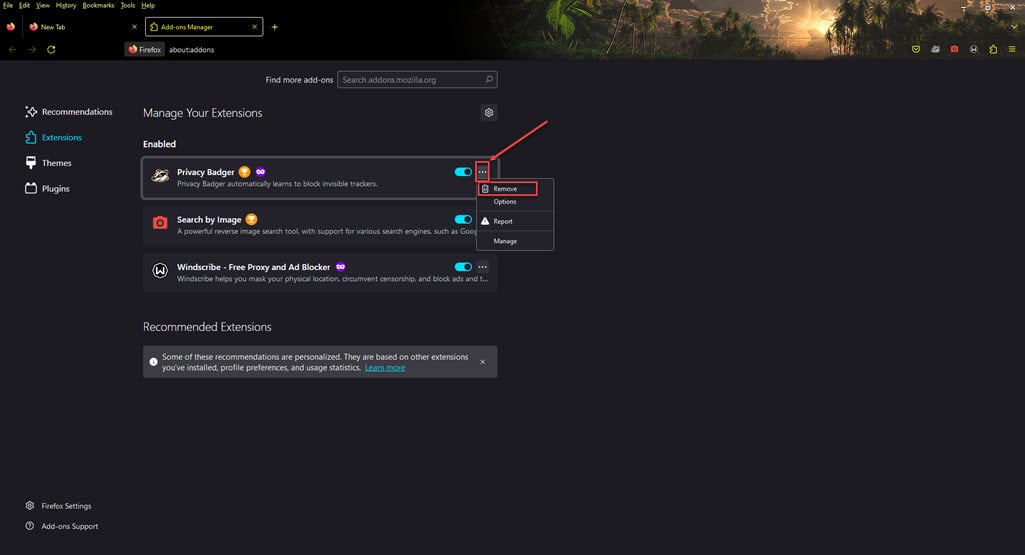
Step 1: Click on the Menu (triple horizontal bars) icon, and then in the dropdown menu, click on the Addons and themes option.

Step 2: Click on the triple horizontal dots icon beside the extension you want to remove, and then, in the dropdown menu, click Remove.
In conclusion, StandartProductFld is a potentially unwanted program that can disrupt your browsing experience and compromise your privacy. Following the steps outlined above, you can effectively remove it from your system and prevent its recurrence, ensuring a safer and smoother online experience.





