Photo: Ascannio / Shutterstock.com
Is your Twitter, now X, account getting logged out unexpectedly? The problem arose in May this year when several Twitter users started reporting this problem.
As reported by media outlets, this problem is specific to the web user of Twitter, although mobile app users may face similar situations in the future.
In this article, we’ll analyse why you’re getting logged out of your X (formerly Twitter) account automatically and provide solutions.
Potential reasons for your Twitter account getting logged out
There are several reasons why your Twitter account may get logged out automatically. Some of the most common reasons are as follows:
- Account security issues: Usually, social media platforms log out of your account if they detect any suspicious activity, such as someone logging in from an unknown location or device. Then, to verify your identity, Twitter may send codes to your email or phone number.
- Browser issues: Maybe your browser is outdated, or there is an issue with the browser cache files.
- Problems with the Twitter app: The application can have problems, including a corrupt cache, an outdated version or incompatibility with the device OS.
- Programming issue: The latest issue with Twitter was caused by “bad front-end deployment”, as reported by Ryan Mac, citing two Twitter sources. Although less frequent, this is also one of the causes of platforms performing erratically.
Also read: Fix: Twitter Search not working
Twitter account getting logged out: Possible fixes
Now that we have understood the potential reasons why your Twitter account is getting logged out let us head to the fixes so you can resume your Twitter journey quickly.
Relaunch the Twitter app
Sometimes, simply closing and reopening the app can work wonders. This process can refresh your connection and clear any temporary errors.
You can do the same with your browser, too.
Check your internet connection
Poor or unstable internet connections are bound to cause problems. To fix this, check and resolve your internet issues.
Navigate to this article here to fix your internet connection.
Head to this article here to fix your WiFi.
Clear browser cache and cookies
Over time, the browser cache and cookies may get corrupted, causing issues such as your Twitter account getting logged out suddenly.
Head over to this article to learn how to clear Google Chrome’s cache and cookies.
Edge users can head to this article to understand how to clear cache and browsing history.
Update X app
Outdated apps cause a lot of minor issues like this one. So, it would be wise to update your X app regularly so that you never see such problems and fix several security issues.

To update the X app, open the Google Play Store and then search for the app. After that, tap on Update.
Enable cookies on your browser
We often block cookies from websites that can block platforms like Twitter from accessing your stored data, like passwords.
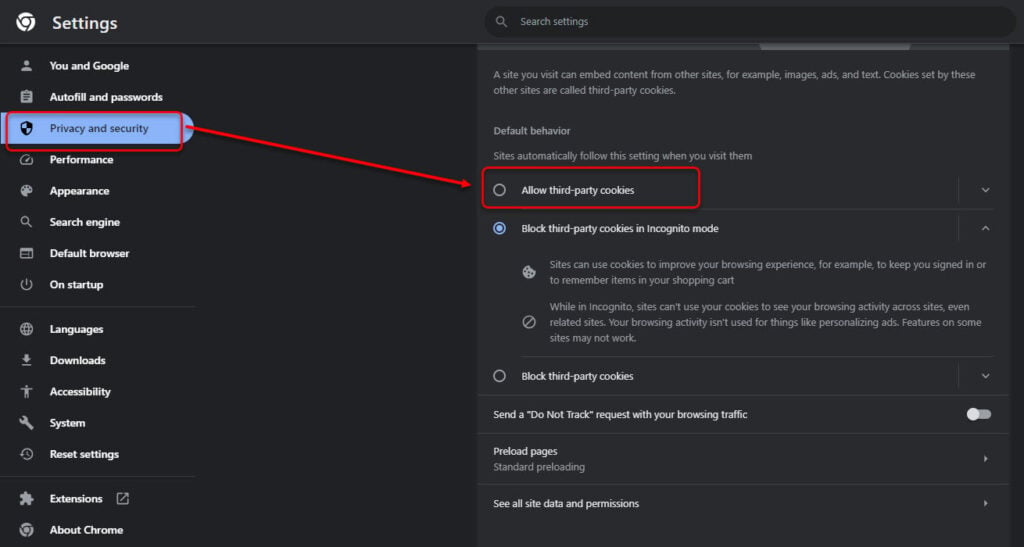
So, make sure that you have enabled cookies on your browser. Head to the three-dot button > Settings > Privacy and security > Allow third-party cookies on Chrome.
Clear storage and cache of the Twitter app
As with browsers, apps also store cache to load the information you regularly use quickly.
But here, too, the cache can become corrupt and cause issues like your Twitter account getting logged out repeatedly. Thus, you must clear the Twitter app’s cache and storage.
Head to this article to understand how to clear the storage and cache of an app in Android and iOS.
The steps mentioned here will surely help you fix the problem. However, if nothing works, contact Twitter support for additional help.
Also read: How to export a video in Premiere Pro?