Navigating the internet without coming across Google LLC is rare. Google is everywhere, from search engines to cloud computing and advertising to mobile operating systems. But what exactly is Google LLC, and what does it mean for users, especially on platforms like a Mac?
This article discusses what Google LLC is, what it does, whether it is safe and how to disable it on your Mac.
What is Google LLC?
The ‘Google LLC’ login item is a feature on macOS that allows certain Google software or services to start when you log in to your Mac automatically. This includes applications like Google Chrome, Google Drive, and other Google products. This ensures seamless integration with Google products and faster access to their functionalities.
It’s not a separate application but rather a general term used by macOS for background processes associated with Google software and services installed on your Mac.
Also read: What to do if Google Search is not working?
What does it do?
The specific actions of Google LLC vary depending on the installed Google applications:
- Google Chrome: The most common culprit. The “Google LLC” login item likely manages tasks like updating the browser, syncing bookmarks, and maintaining browser settings.
- Google Drive: If the desktop app is installed, it uses this login item to sync your files to your Google Drive account automatically.
- Other Google applications: Any other Google software you have installed, like the Gmail app or Google Photos, might contribute to this background process.
Why is it there?
It’s a convenient feature. By automatically starting Google services, you don’t have to launch them each time you log in manually. This provides a smoother user experience and faster access to your Google ecosystem.

Also read: What is CCXProcess? Why is it hogging CPU resources?
Is it safe?
Yes, Google LLC is a legitimate component of Google software and is not a threat to your Mac. It allows Google services to function efficiently and offer a convenient user experience.
Managing Google LLC login item
You can manage the Google LLC login items by either disabling the automatic startup or uninstalling the app:
Disable Automatic Startup
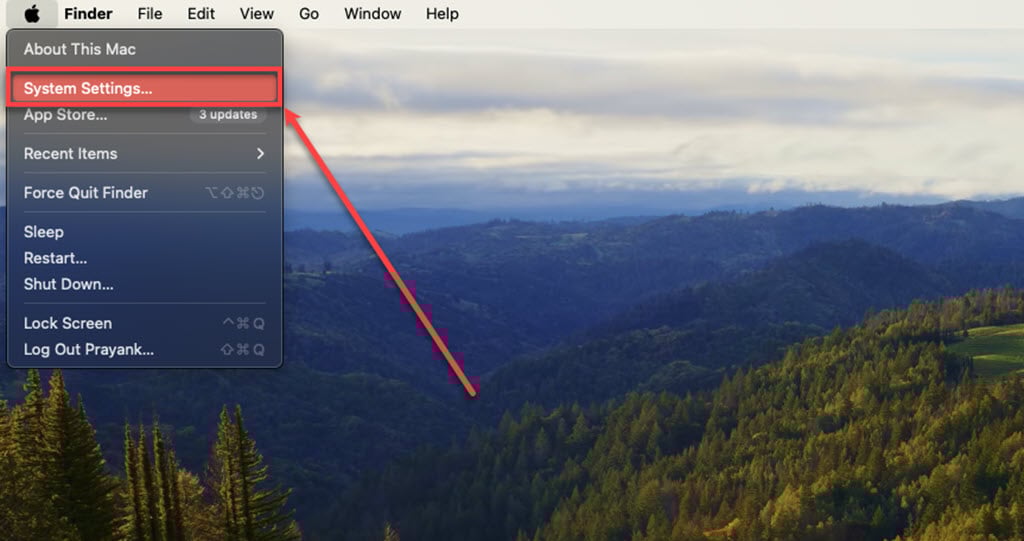
Step 1: Click on the Apple logo, and then click on System Settings in the dropdown menu.
Step 2: Click on the Users & Groups, select your user account, and click the Login Items tab.

Step 3: Find and uncheck the box next to Google LLC.
Uninstall the app
If you don’t use Google products, you can uninstall the relevant software to remove the login item. Here’s how you can do it:
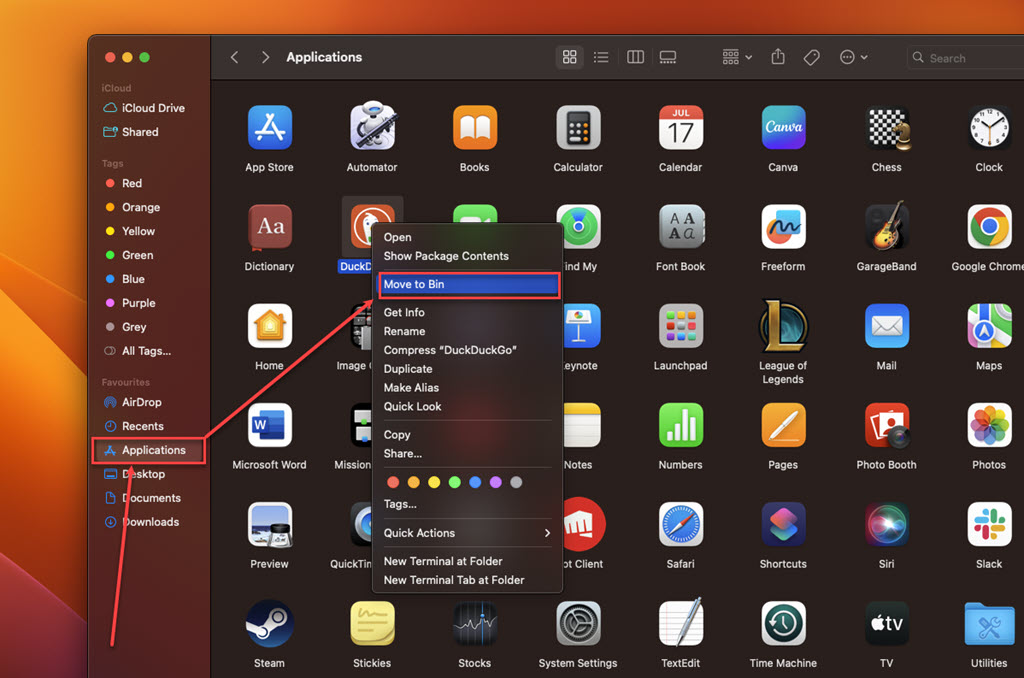
Step: Go to Finder, click on the Applications option in the sidebar, right-click on the suspicious app, and then click the Move to Bin option in the dropdown menu.
In conclusion, the Google LLC login item is simply a mechanism for Google software to function smoothly on your Mac. You can choose to disable it, but doing so might affect the user experience of your Google applications.