As one of India’s leading e-commerce platforms, Flipkart offers a seamless shopping experience for millions of customers. Whether you’re purchasing electronics, clothing, or household items, it’s essential to have an invoice for your purchases. Invoices serve as proof of purchase and can be necessary for warranty claims, returns, or expense tracking.
This article discusses how to download the invoice from the Flipkart website and mobile app in a few simple steps.
Also read: How to track a Flipkart order?
How to download the invoice on Flipkart website?
If you use the Flipkart website more often and want to download the invoice for an order you placed on Flipkart, then follow the steps below to download the invoice on the Flipkart website:
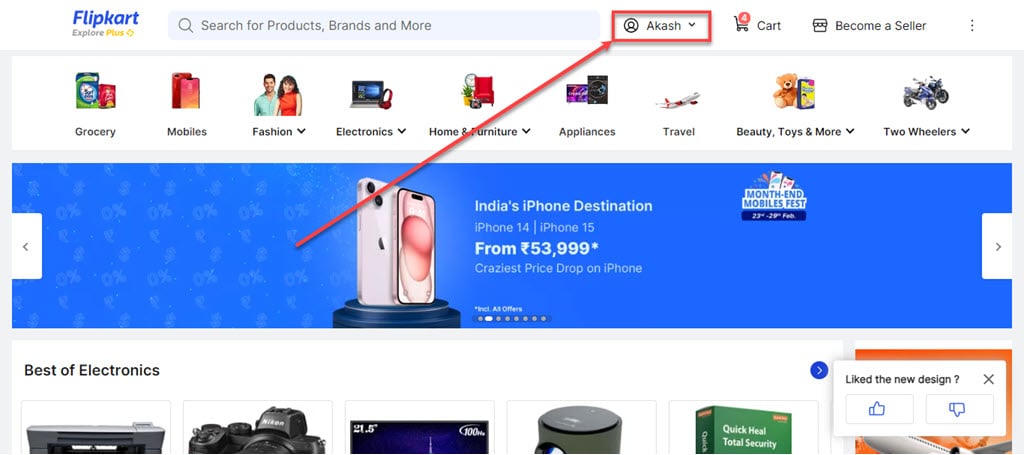
Step 1: Open the Flipkart website, log in with your account and click on the Profile icon beside the search bar at the top.
Step 2: In the dropdown menu, click on the Orders option.

Step 3: Click on the order you wish to download the invoice, from the list provided.

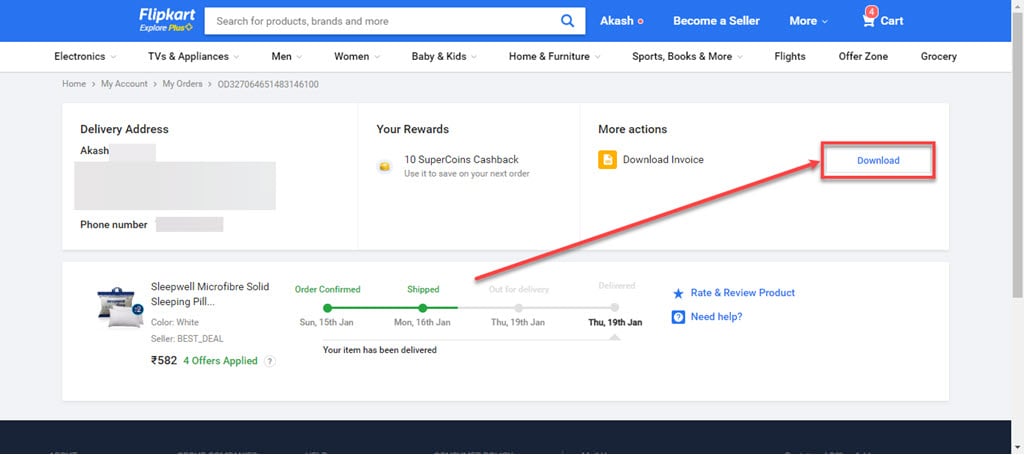
Step 4: In the More actions section you will find the Download Invoice option. Click on the Download button.
How to download the invoice on Flipkart mobile app?
If you use the Flipkart mobile app more frequently than the website and you wish to download the invoice for an order, then follow the steps below:

- Open the Flipkart app on your phone and tap on the Account tab.
- On the next page, tap on the Orders option available at the top.
- Now, tap on the order you wish to download the invoice, from the list provided.
- On the next screen, you will see the various order details, below the order details Invoice Download button is available, tap on it.

Also read: How to change the address in Flipkart?