
Flipkart offers various payment methods including credit/debit card, net banking, UPI and Flipkart Wallet.
You will have to add a debit or credit card to Flipkart before using it to buy the products. The procedure is quite simple and in this article, we will explain it.
Why add a card in Flipkart?
Before dealing with the procedure, let us first understand why you should add a card to Flipkart.
- Adding a card saves a lot of time when completing the transaction.
- Moreover, secure and faster checkout is ensured whenever you enter save your card on Flipkart.
- Saving or adding a card also ensures that you can make payment from anywhere even when you don’t have access to the card. All you need is your mobile phone to get the OTP.
Also read: How to download the invoice on Flipkart?
How to add a card in Flipkart?
Now that we have understood why you should add a card to Flipkart, let us quickly learn the steps.
On the website
The easiest way to add a card is during the transaction process. Here’s how:
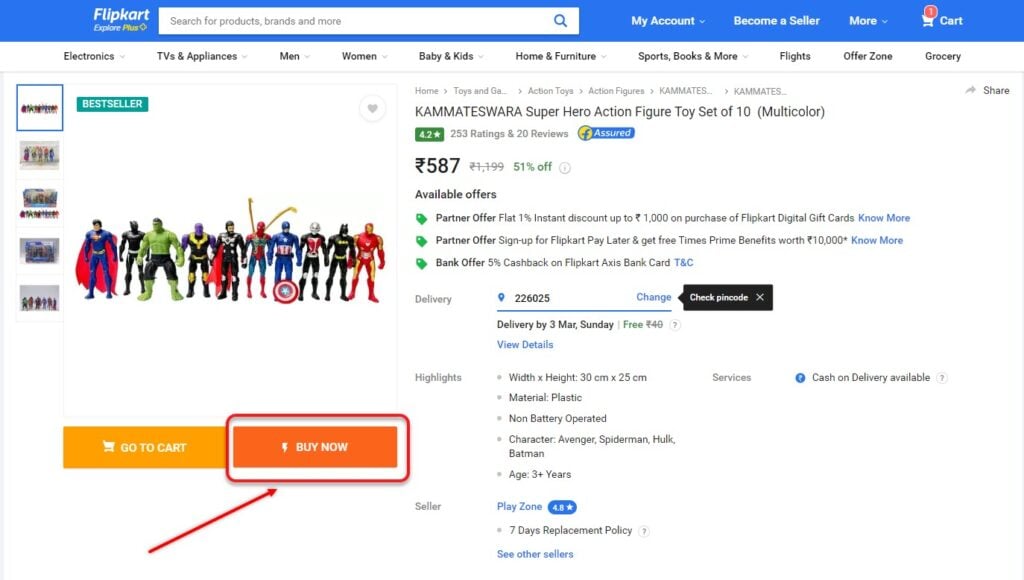
Step 1: Open Flipkart and then choose a product to buy. Click on Buy Now.
Step 2: Click on Continue.

Step 3: Under the Payment option, select the Credit/Debit/ATM Card option and enter your card details including the card number, CVV code, and the date of expiration.

You can use the same card next time you want to purchase something on Flipkart.
On the app
Follow the instructions given below:

- Open the Flipkart app and then select the product you want to buy. Next, tap on Buy now.
- Tap on Continue.
- Next, scroll down a bit and then tap on the Credit/Debit/ATM Card option to enter the card details.
You can use the same card for shopping next time on the app.
In conclusion, adding a card to Flipkart is quite easy and usually involves just a few clicks. You will have to select a product that you want to buy and enter the card details during the transaction. Once you are done, you can use the same card the next time you buy anything from the platform.
Also read: How to use Flipkart Super Coin?




