
As people rely more on smartphones daily, keeping their devices secure has become a top priority. Even iPhones, known for their strong security features, can face hacking attempts. If someone suspects their iPhone might have been hacked, it’s important to understand how to look for signs of unauthorised access.
This article discusses three ways to check if your iPhone is hacked in settings and three ways to help you stay protected against unauthorised access.
Below we have discussed:
Also read: How to change the WiFi password on iPhone?
Ways to check if your iPhone is hacked
Below, we have explained the three ways that will help you check if your iPhone is hacked:
Check the Battery usage
If your iPhone is using up its battery unusually fast, it might be a sign that it has been hacked. Malicious software running in the background can increase power consumption, causing your battery to drain faster. To examine your battery usage, follow the steps below:
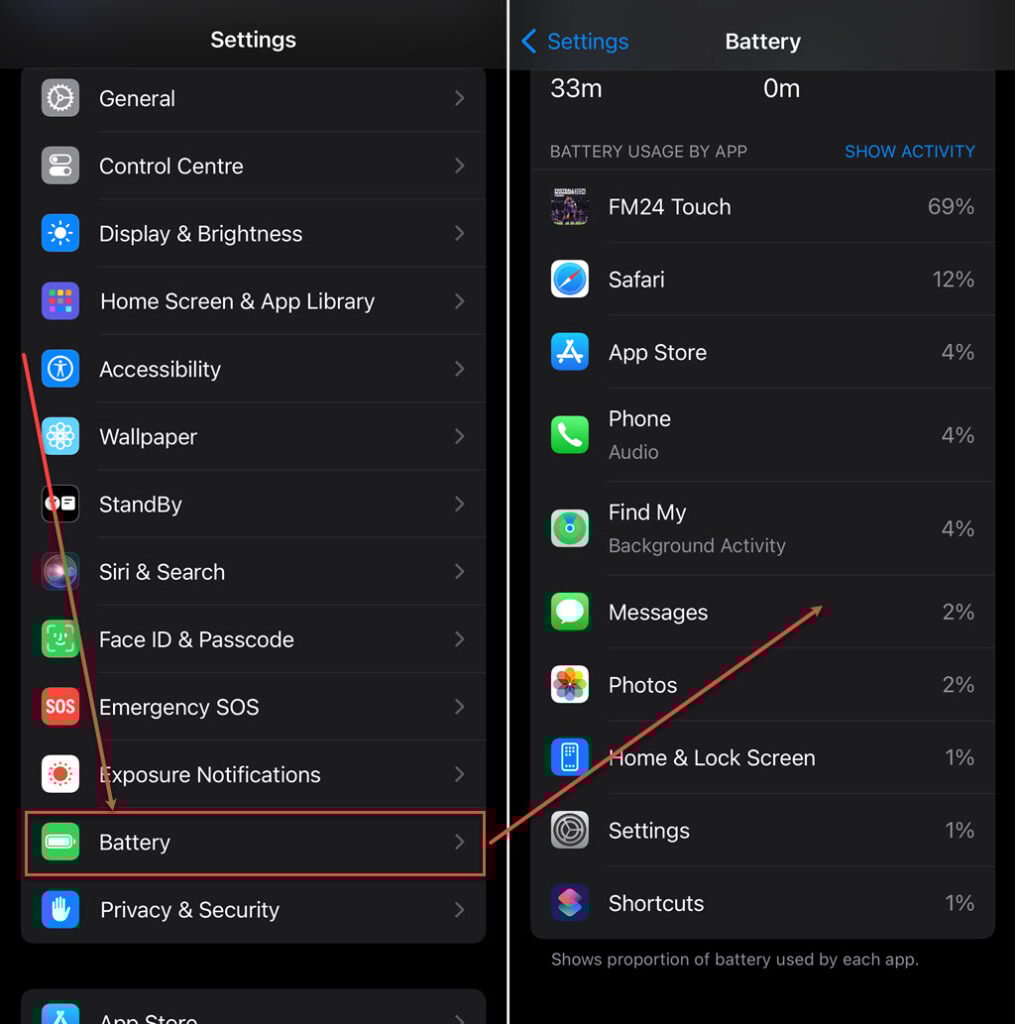
- Go to the Settings app on your iPhone and tap on Battery.
- Check the list of apps and processes consuming battery. If you find any suspicious app, remove it.
Check the internet usage
If you notice your iPhone uses a lot of data, it could be a sign of unauthorised activities. Hackers often use data to send information from your device to external servers. Here are the steps to check the data usage on iPhone:

- Go to the Settings app on your iPhone and tap on Mobile Data.
- Check the list of apps and their data consumption, and also look for any suspicious apps that are consuming significant amounts of data.
- Tap on System Services to check the services running on your iPhone.
Check app permissions
The apps you install on your iPhone might ask for different permissions to do certain things or access specific information. If your iPhone’s security has been breached, you might see unfamiliar apps with too many permissions they don’t need. Here’s how to check app permissions:

- Go to the Settings app on your iPhone and tap on Privacy.
- Click on specific permissions like Camera, Microphone, or Contacts.
- Check the list of apps that have access. Remove permission for any apps that seem suspicious or unnecessary.
Also read: Top 7 interior design apps
How to keep yourself protected?
Here are three ways to keep yourself protected against hacking attempts:
Update your iPhone
It’s important to update your iPhone’s software to keep it safe. Apple frequently puts out updates that fix security issues, making it harder for hackers to get in. Here is how to update your iPhone:

- Go to the Settings app on your phone and tap on General.
- Tap on Software Update.
- If an update is available, install it and download the app again. Also, make sure to turn on the Automatic Updates.
Enable Two-Factor Authentication (2FA)
Turning on two-factor authentication gives your iPhone an added layer of security. It means you must take an extra step to verify yourself, usually by receiving a special code on your trusted device when logging into your Apple ID or using certain features. To enable it, follow the steps below:

- Go to your phone’s Settings and tap Your Name.
- Tap on Sign-In & Security.
- Tap Turn on Two-Factor Authentication.
- Tap on Continue and then follow the on-screen instructions.
Run a security scan
To ensure you catch any possible security issues, think about running a security scan on your iPhone. Many reliable antivirus apps on the App Store check your device for malware and other weaknesses. Install a trusted security app, run a scan, and follow the suggestions it gives you.
Also read: How to delete hidden apps on your iPhone?


