
Mobikwik is a digital payment platform in India. Founded in 2009, it has gained much traction recently. It has over 100 million users and over INR 5 billion in revenue.
However, many people might not be satisfied with Mobikwik’s services and want to delete or deactivate their accounts. In this article, we will explain how to deactivate the Mobikwik account easily.
Here are the steps that we will cover:
- Empty your Mobikwik wallet
- Delete any saved cards from the Mobikwik platform
- Talk to Mobikwik customer care to deactivate or delete your account
Step 1: Empty your Mobikwik wallet
You should start by emptying your Mobikwik wallet and transferring the amount either to your bank account or another wallet.
Here’s how to transfer the money from Mobikwik wallet:
On your computer
Head to this link to head to the online money transfer and then enter the bank account details of your bank account.
On Mobikwik app
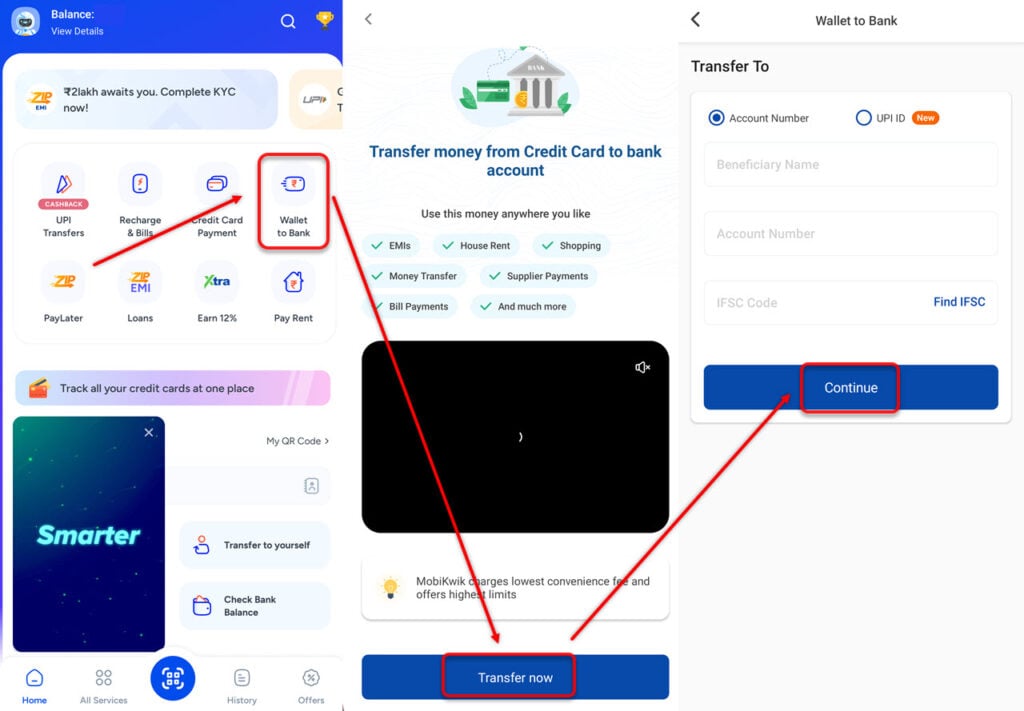
- Open Mobikwik app and select Wallet to Bank.
- Tap on Transfer now.
- Finally, add the beneficiary name (this can be your name), account number and other details such as IFS code. When you are done, tap on Continue.
Also read: How to enter the referral code in Google Pay?
Step 2: Delete any saved cards from Mobikwik platform
Now that you have transferred the funds from the Mobikwik wallet, it is time for us to delete saved cards from the platform so that the credit/debit card information is not stored with the company.
On computer
Open Mobikwik and then sign in with your mobile number. Now, follow the steps given below:
Step 1: Click on the Balance tab at the top-right of the screen. After that, select My Wallet.

Step 2: Now, click on Saved Cards to see all the cards that you have linked with Mobikwik.

Now, tap on Remove to remove the cards.
On Mobikwik app
Follow the instructions below:
- Tap on your profile icon at the top-right corner of the screen.
- Head to My Wallet.
- Now, tap on Saved Cards.
- Finally, select Remove.
Also read: How to increase PhonePe limit?
Step 3: Talk to Mobikwik customer care to deactivate or delete your account
When you are finished with the above two steps, all you need is to communicate to Mobikwik that you want to close or deactivate the account.

- Tap on your profile picture at the top right corner of the screen.
- Next, scroll down and tap on Help.
- Now, head to My Acccount and KYC.

- Next, tap on Account Deactivation.
- And finally, select Close my Account with Mobikwik.
Remember to clear any outstanding dues before deactivating the account or else Mobikwik won’t allow you to successfully close the account.
Also read: Account Blocks on PhonePe: Everything you need to know




