Facebook is a widely used social platform that allows people to connect with friends, family, and acquaintances worldwide. Because of its many features, many users become curious whether they can find out who is checking their Facebook profile.
This article discusses whether Facebook allows people to track their profile and a few ways to know who is viewing it.
Also read: How to check-in on Facebook?
Does Facebook allow people to track who viewed their profile?
Facebook keeps it a bit of a secret regarding who views your profile. Although you can see who likes, comments, or shares your posts, Facebook doesn’t have a direct way to tell you who’s been looking at your profile. Because of this, some third-party apps and methods have popped up claiming that they can tell you who viewed your profile, but they may not be trustworthy.
Third-Party Apps and Extensions
You may have encountered numerous apps and browser extensions promising to reveal your profile visitors. These tools often request access to your Facebook account and data, which should be a red flag. Permitting them could put your privacy and security at risk.
It’s important to note that Facebook doesn’t allow these third-party apps to track profile visitors. Moreover, you can’t be sure if these apps work or if they’re trying to trick you into giving away your personal information, so it’s best to avoid them.
Also read: Atlas VPN FAQs: Everything you need to know
Various ways to check your profile visitors
There are a few ways to tell who is visiting your profile regularly, but it doesn’t mean that they are stalking your profile.
Check who engages with your posts the most
A simple way to figure out who might be checking your Facebook profile is to make a few posts in a particular period, let’s say, in two or three days. Then, look at the people who like, comment, or most engage with your posts. This can give you a clue about who might look at your profile often.
Use Page source code to view top viewers
You can also use the page source code to check out your profile viewers. The steps below are to use the page source code to check your viewers.
Step 1: Log in to your Facebook profile on your PC and right-click on a space on the page, and then in the dropdown menu, click on the View page source option.

Step 2: On the page source code screen, press Ctrl + F to open search and type Buddy.

Step 3: In the result, you will find a user ID; if you scroll to the right, you will also find the username.
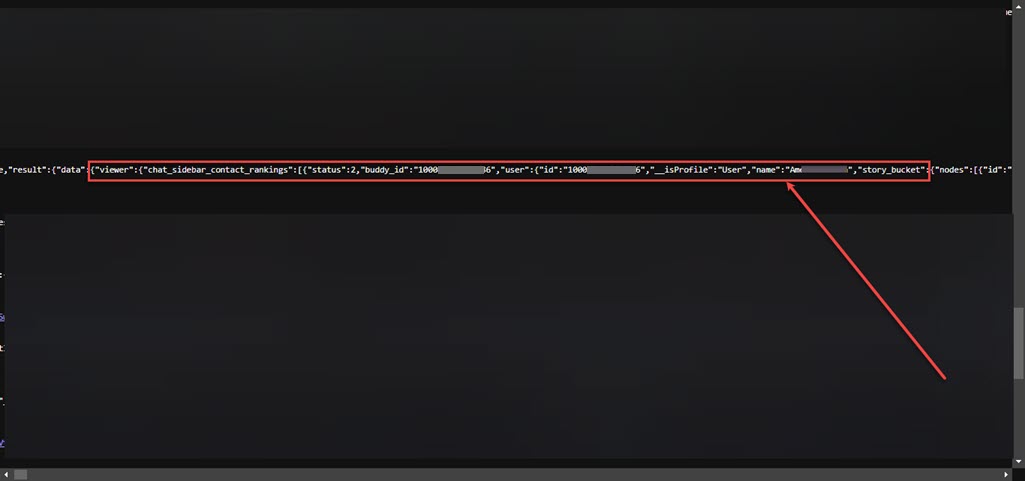
These are your Facebook profile viewers.
Also read: How to see sent friend requests on Facebook?