
The role of location services in our daily lives has become increasingly vital. Whether it’s for navigation, discovering nearby places of interest, or staying connected with friends, location is at the core of many of the smartphone activities. Yet, there are times when you might encounter the frustrating issue of your location turning off unexpectedly.
If your location services are turning off automatically, this article discusses some common causes of the issue and a few ways to help you fix the issue.
Common causes for location turning off
Here are a few common reasons that might be disabling the location services automatically:
App Permissions
Every app on your device needs specific permissions to access location services. If you’ve denied or restricted location permission for a particular app, it could lead to the location turning off while using that app.
GPS signal interference
GPS relies on signals from satellites to determine your precise location. However, certain environmental factors can interfere with these signals, causing your location to turn off intermittently. Tall buildings, dense vegetation, and adverse weather conditions are examples of factors that can weaken GPS signals. If you’re facing location issues in such areas, consider moving to an open space or restarting your device to reestablish the GPS connection.
Battery-Saving settings
Another common cause for your location turning off is when your phone enters a battery-saving mode. This mode is activated to conserve battery life by shutting down or disabling services that consume a lot of power. Essentially, it helps your device last longer on a single charge and allows you to recharge it before it completely runs out of power.
Also read: Why is my iPhone battery draining so fast?
How to fix the issue?
Here are a few ways that might help you fix the issue:
Restart the device
A simple restart can do wonders and resolve any potential issue in your smartphone. This action can clear out any temporary glitches or issues that may be causing your location services to malfunction.
Ensure the location is enabled
Before trying any other troubleshooting methods, make sure your location is enabled. To enable location on iPhone, follow the steps below:

- Open the Settings app on your iPhone and tap on the Privacy option.
- Tap on the Location Services option.
- Now, turn the toggle on beside the Location Services.
Change app permissions
If the location services automatically turn off while using an app, then it is possible that you haven’t given the required app permissions to the app. Change the app permissions for the app with which you are encountering the issue. To do that, follow the steps below:
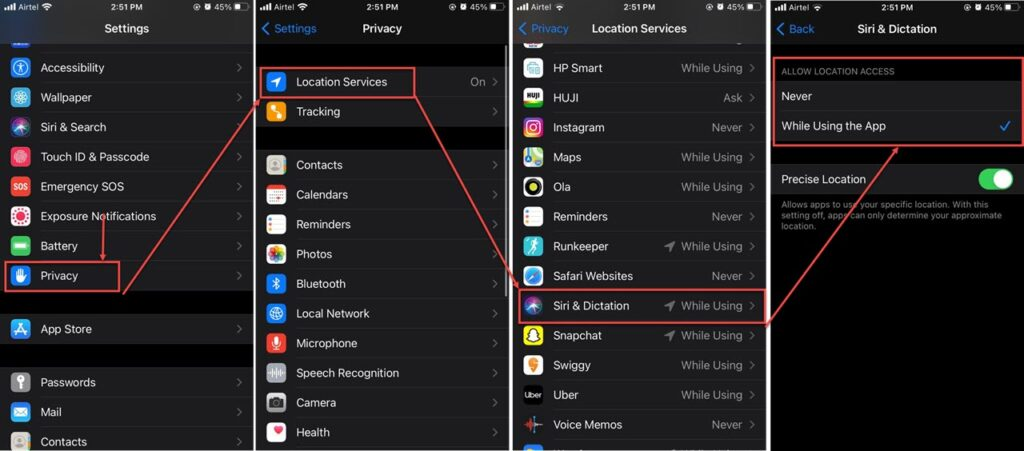
- Open the Settings app on your iPhone and tap on the Privacy option.
- Tap on the Location Services option.
- Scroll down, find and click on the app for which you want to change the app permissions.
- Change its settings to While using the app.
Update your iPhone
Outdated software can make your smartphone vulnerable to many issues; keeping it up-to-date ensures you get the latest bug fixes and improvements. To check for updates, follow the steps below:
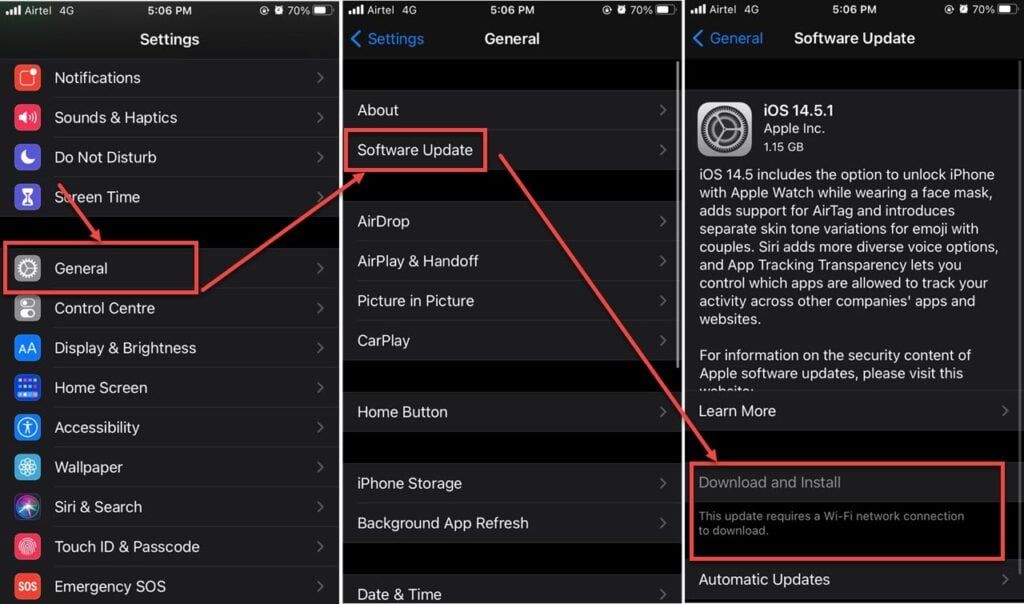
- Go to the Settings app on your iPhone and tap on General.
- In general settings, tap on the Software Update option.
- Download and install the updates, if available.
Disable Battery-saver mode
Low power mode, or in simple words, battery saver mode, will turn off services that consume more power. Either put your phone on charge or turn off the Low power mode. To turn off the Low-power mode, follow the steps below:
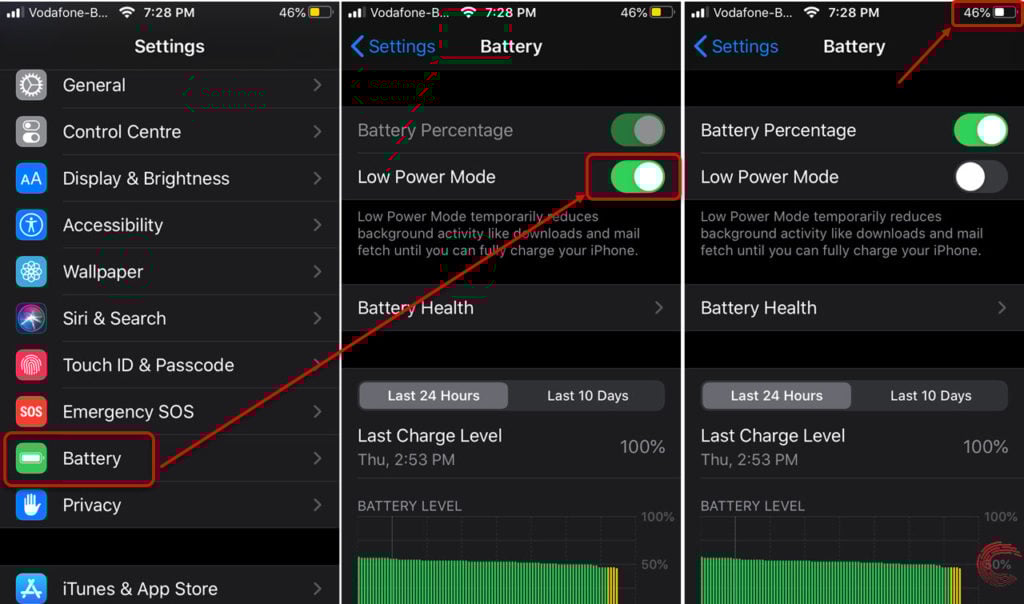
- Go to the Settings app on your iPhone and tap on Battery.
- Now, turn the toggle off beside the Low Power Mode.
Also read: How do I reset my iPhone without losing everything?




