Many people have reported encountering error code 516 in Baldur’s Gate 3, which prevents them from saving their game.
This error can be frustrating for those players who are in a habit of playing the game for an extended period in one go, thereby covering a lot of ground.
Baldur’s Gate 3 is one of the most anticipated RPG games of the year, with a 10/10 rating on Steam. In this article, we’ll explain what steps you can take to fix this error and save your game.
Baldur’s Gate 3 error code 516: Possible reasons
The exact cause of the error code 516 is still unknown. However, it seems like there’s a minor bug in the game causing this issue.
There could also be an issue with your computer’s hard drive space, as the game requires some space to save the gaming progress files.
This error can also be attributed to the Steam cloud error.
Also read: Fix: Baldur’s Gate 3 failed to load the main menu
How to fix Baldur’s Gate 3 error code 516?
Now that we have understood the possible reasons behind the error code 516 in Baldur’s Gate 3 let us not head to the fixes.
Clear some hard disk space
As explained earlier, one of the primary reasons for this error is less space on your hard drive.
So, clear your drive where the game is installed. You can delete previously saved game files of the game. Or, you can uninstall a few games or applications you are not using anymore and will not need in the future.
Change the saved game location
This method worked for one user on Steam. The user moved their Lara directory from the current (C drive) location to another.
Run the following command in the command prompt:
mklink /d “C:\Users\username\AppData\Local\Larian Studios\Baldur’s Gate 3” “D:\Larian Studios\BG3\New Save Location”
The first address is the current location of the Larian directory, and the second address is the new address. You can notice that the initial directory is C, and the new directory is D.
You will have to just substitute the address in the above command with your current Larian directory, and you’re good to go.
Verify the integrity of Baldur’s Gate 3
Here’s how to verify the integrity of Baldur’s Gate 3 on Steam:
Step 1: Head over to your Steam Library, right-click on Baldur’s Gate 3 and select Properties.

Step 2: Now, click on Local Files.

Step 3: Next, select the Verify integrity of local files…
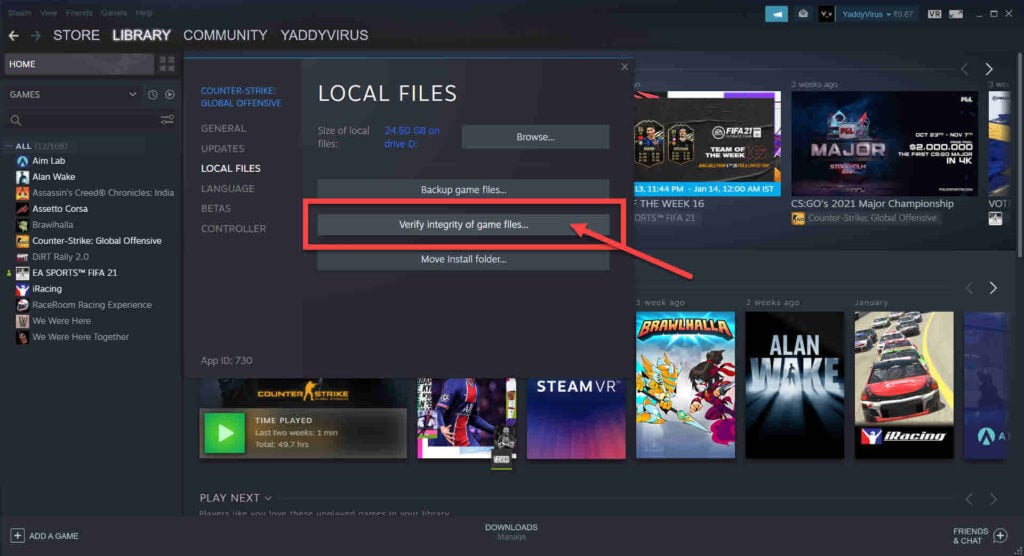
If you’ve noticed, the above screenshots show a different game. However, the steps are the same and you can apply them on Baldur’s Gate 3.
Make a trade with NPC
Some players on Reddit have reported that doing trade with an NPC can also counter the bug.
If you cannot save the game, talk to a trader, but avoid selecting the dialogue option to trade. Instead, use the suggested button to initiate the trade and buy any cheap item from the NPC.
This simple trick has worked for many people.
Thus, Baldur’s Gate 3 error 516 is bug-related in the game and can be fixed easily. Just follow the four methods we have listed above to resolve the error and save the progress.
Also read: Fix: A D3D11-compatible GPU is required to run the engine