Reddit, a popular online community platform, allows users to engage in discussions, share content, and connect with people worldwide. While interacting on Reddit, users may find the need to manage their messages, whether it’s removing an outdated conversation or addressing privacy concerns.
On Reddit, you can’t directly delete entire chat conversations, but you can hide them. Nevertheless, you can delete individual messages you sent within those chats.
This article discusses how to delete sent messages in a chat and how to hide chats on the Reddit web and mobile app.
Below we have discussed:
Also read: How to send chats and messages on Reddit?
How to delete sent messages on Reddit?
The steps to delete sent messages on Reddit web and mobile are similar, and below, we have explained the steps to delete messages on Reddit web and mobile app as well.
Delete sent messages on the Reddit web
Step 1: Open the Reddit on any browser on your PC and click on the Chat icon available beside the Notification icon at the top.
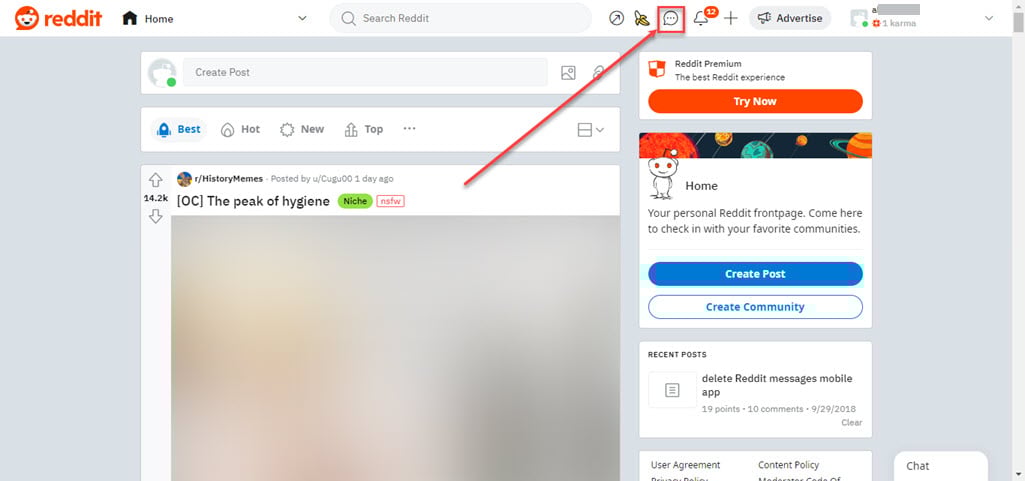
Step 2: In the chat section, open the conversation, hover over the message you want to delete and click on the Trash icon.

Step 3: Click the Yes, Delete button to confirm your action.

Delete sent messages on the Reddit mobile app

- Open the Reddit app on your phone and tap the Chat tab at the bottom.
- Tap on the chat conversation.
- Long press the message you want to delete.
- In the options that appeared, tap on the Delete message option.
- Tap on the Yes, Delete button to confirm your action.

Also read: How to know if someone blocked you on Reddit?
How to Hide chats on Reddit?
Below, we have discussed the steps to hide the chats on Reddit web and Reddit mobile app.
Hide chats on the Reddit web
Step 1: Open the Reddit on any browser on your PC and click on the Chat icon available beside the Notification icon at the top.

Step 2: In the chat window, click on the Gear icon and then click on the Hide chat option in the menu.

Hide chats on the Reddit mobile app

- Open the Reddit app on your phone and tap the Chat tab at the bottom.
- Tap on the chat conversation that you want to hide.
- Tap on the Triple dot icon at the top right corner of the screen.
- In the settings, tap on the Hide chat option.
- Tap on the Yes, Hide button to confirm your action.

Also read: Can you add a collaborator on Instagram after posting?