
Zomato, launched in 2008, is one of India’s most popular food delivery apps with over 15 million monthly users in 2022.
One of the significant features of Zomato is that it records all your orders over the years. This means you can check out the order from a restaurant you are forgetting or quickly reorder the same dish configuration.
However, there are times when you might want to delete your order history from Zomato for various reasons. In this article, we will explore how to do this easily and effectively. But before moving on to the steps, let us understand why you should do this.
Why delete order history from Zomato?
You may wonder why you would want to delete your order history from Zomato in the first place. Here are some reasons why:
- Privacy reasons: Sometimes, deleting your order history protects your privacy from prying eyes. As the order history contains a lot of information including your address, phone number, email account and other financial details, it is a goldmine for potential fraud if leaked.
- Security breaches: In case, the servers of Zomato get compromised, the attackers will access all your data including the financial details by merely checking one of your orders.
- Cleaning your Zomato account: Deleting orders will declutter your Zomato account and you can manage it better. If you habitually use the app regularly, over time, order history will pile up and you’ll have difficulty navigating to a particular order.
That being said, deleting the Zomato order history is no panacea for protecting your online privacy but it can be a start.
Also read: How to cancel an order on Zomato?
Delete order history on Zomato
Now that you have understood why you should delete your order history from Zomato, let us not dive into the steps.
Before we continue, we would like to point out that there is no option on the Zomato app or the website that will let you delete your order history directly. However, there is one way to bypass this issue: by contacting customer support and requesting them to delete the order history.
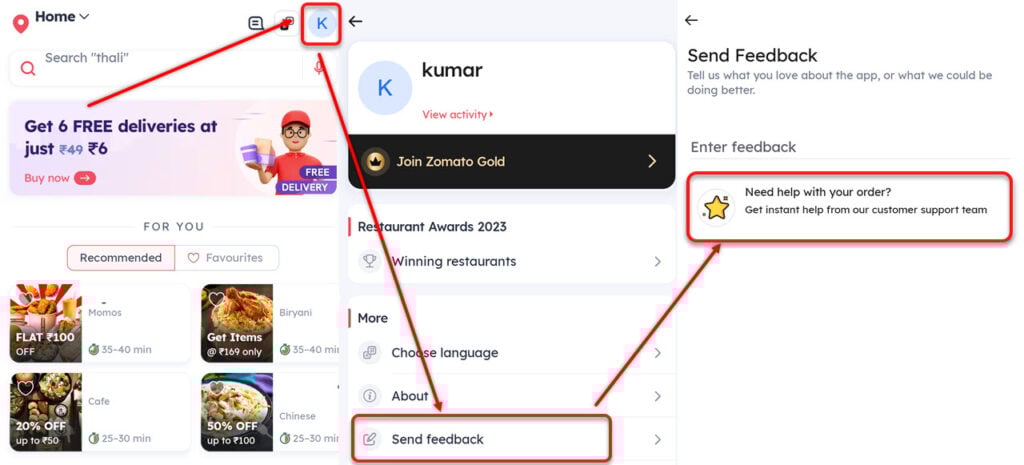
- Open the Zomato app and then tap on your profile icon at the top right of the screen.
- Scroll down to the end and then select Send feedback under the More heading.
- Now, tap on Need help with your order?
After the chat support executive contacts you, ask them politely to delete your order history. If they ask for a reason, mention any one of the reasons that we have listed in the above section and you are good to go.
In case, you have not completed the chat from the app, usually, Zomato calls you back to ask about the problem. You can initiate the process on the call too.
In conclusion, to delete the order history from Zomato, you will have to ask the support executive to help you. There is no direct option on the app or the website to do so.
Also read: How to delete your Zomato account?




