
PDFConverterHQ is a potentially unwanted application (PUA) that claims to offer convenient features for converting various file formats to PDFs. However, users often find it installed on their systems without their explicit consent, bundled with other software downloads, or through deceptive advertising.
While it may appear harmless at first, PDFConverterHQ can cause several issues, including intrusive ads, browser redirects, and sluggish system performance.
Here, we discuss PDFConverterHQ, how it gets on your PC, signs of infection, and steps to help you remove it.
Below we have discussed:
Also read: What is the Feed Foundation scam?
What is PDFConverterHQ?
PDFConverterHQ is categorised as a potentially unwanted program (PUP) or adware.
It typically presents itself as a utility that simplifies the conversion of various file formats into PDF documents. While legitimate PDF converters exist, PDFConverterHQ often employs deceptive distribution methods to infiltrate systems. Once inside, it inundates users with intrusive advertisements, redirects web searches, alters browser settings, and may collect browsing data without consent.
How does PDFConverterHQ enter your PC?
PDFConverterHQ usually enters systems through software bundling or deceptive online advertisements. Bundling involves packaging the PUP alongside legitimate software installers. Users may inadvertently install PDFConverterHQ by rushing through the installation process and not deselecting optional offers. Additionally, deceptive online ads may lure users into clicking on them, leading to the automatic download and installation of PDFConverterHQ or similar PUPs.
Signs of PDFConverterHQ infection
Identifying PDFConverterHQ on your system can be crucial for prompt removal. Here are some common signs of infection:
- Unwanted advertisements: Experiencing an influx of pop-up ads, banners, and in-text ads, especially when browsing.
- Browser redirects: Constant redirection to unfamiliar websites, particularly when performing web searches or accessing specific pages.
- Browser modifications: Changes in browser settings such as the default homepage, search engine, or the appearance of new toolbars/extensions without user consent.
- Decreased system performance: Sluggishness or freezing of the system, particularly when browsing the internet.
How to remove it from your PC?
Thankfully, removing PDFConverterHQ from your PC is possible with the right approach. Here’s a step-by-step guide to effectively eliminate this PUP:
Uninstall suspicious program
Go to your PC’s Control Panel (Windows) or Applications folder (macOS) and uninstall any unfamiliar or suspicious programs, including PDFConverterHQ. Here are the steps:
macOS
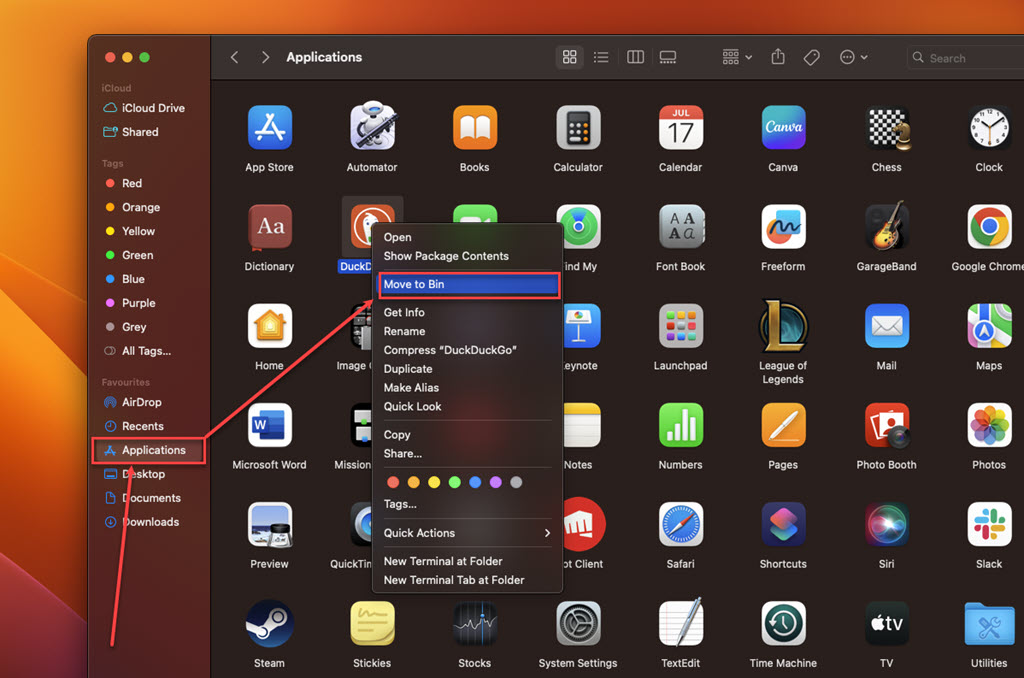
Step: Go to Finder, click on the Applications option in the sidebar, right-click on the suspicious app, and then click on the Move to Bin option in the dropdown menu.
Windows
Check out our article to learn various ways to uninstall apps in Windows 10 and 11
Remove browser extension
Locate any extensions related to PDFConverterHQ or ones you don’t recognise, then remove them. Here’s how you can do it:
Safari
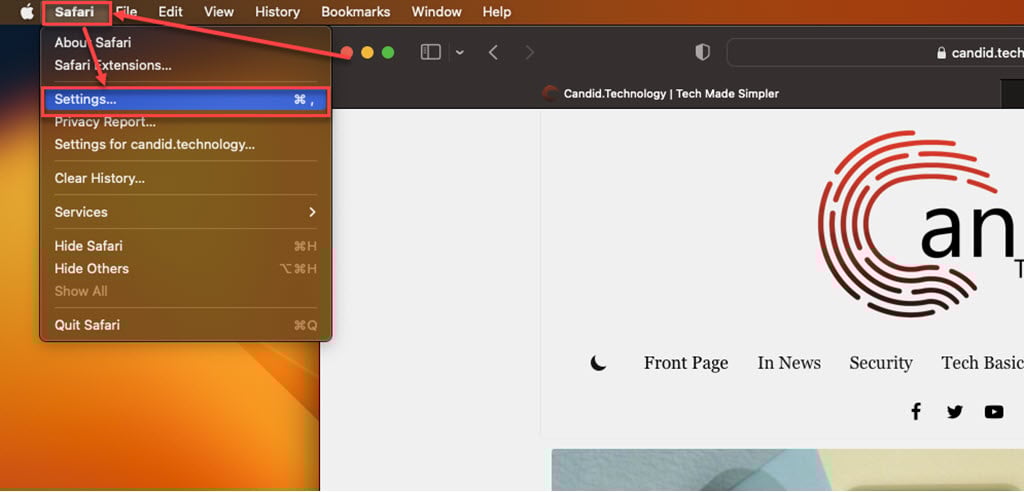
Step 1: Open the Safari browser, click on Safari, and then, in the dropdown menu, click on the Settings option.
Step 2: Click the Extensions tab, select the Extension you want to remove, and then click Uninstall.

Chrome
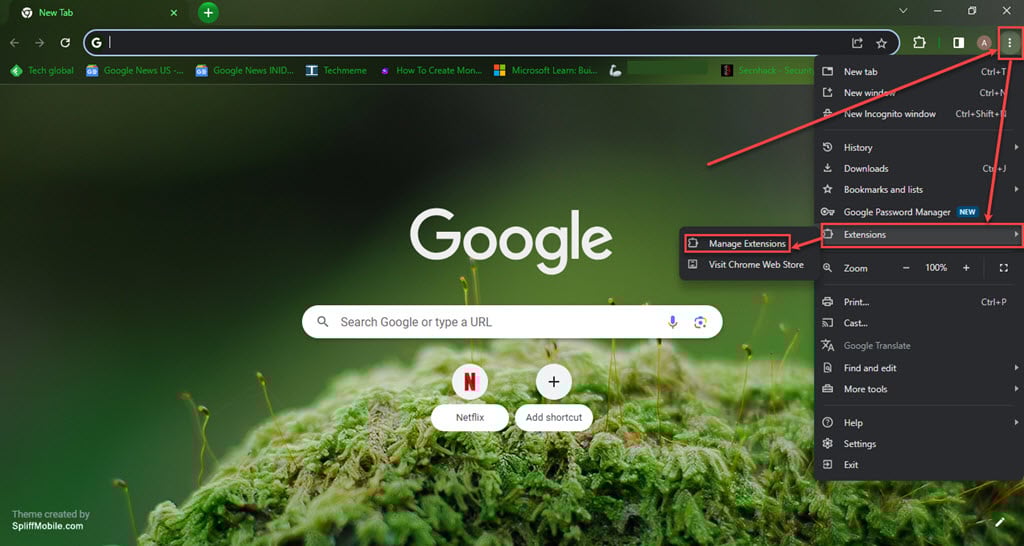
Step 1: Click on the Triple-dot menu. In the dropdown menu, hover over Extensions and then click Manage Extensions.
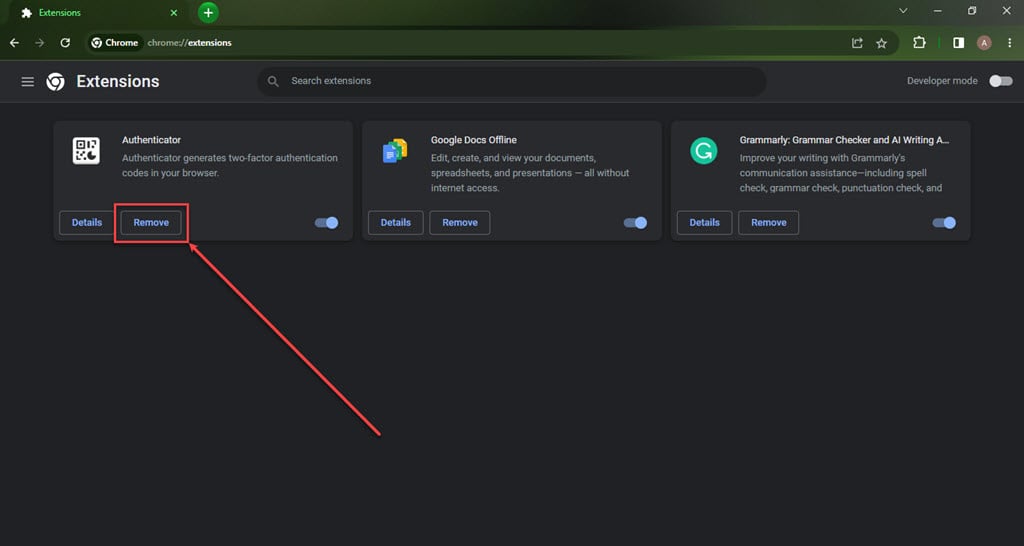
Step 2: Click the Remove button under the extension you want to remove in the Extensions.
Firefox
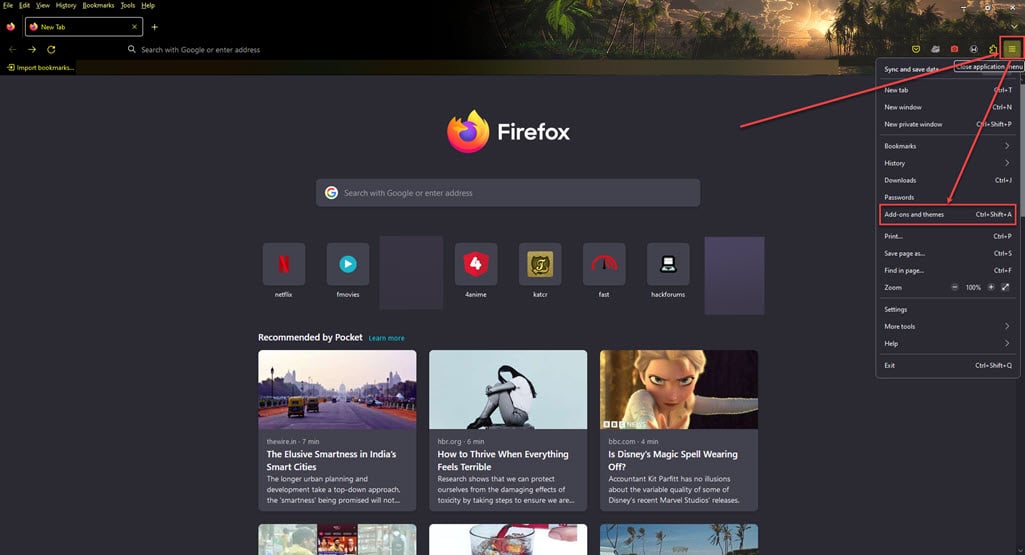
Step 1: Click on the Menu (triple horizontal bars) icon, and then in the dropdown menu, click on the Addons and themes option.
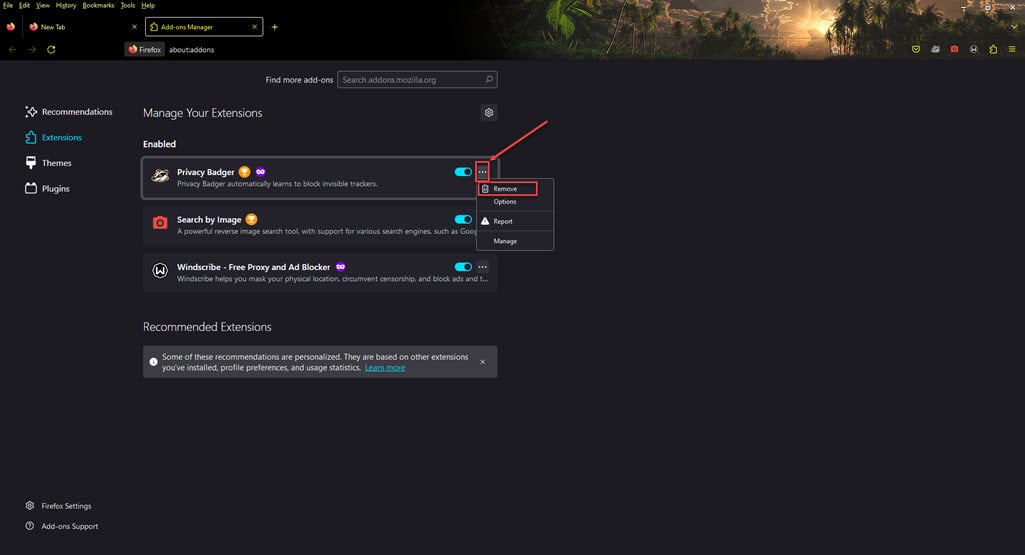
Step 2: Click on the triple horizontal dots icon beside the extension you want to remove, and then, in the dropdown menu, click Remove.
Scan for Malware
Run a thorough scan of your system using trusted antivirus or antimalware software to find and delete any lingering traces of PDFConverterHQ or other potential threats. You might want to try specific anti-malware tools designed to spot and eliminate PUPs and adware. These tools are often better equipped to locate and remove PDFConverterHQ than regular antivirus programs.
Following these steps, you can remove PDFConverterHQ and regain control of your browsing experience. Remember, staying vigilant about software installations and keeping your security software up-to-date can help prevent future PUP encounters.
Also read: What is OpticalUpdater.system? How to remove it from Mac?





