
ChatGPT is a chatbot developed and launched by OpenAI and released in November 2022. It is an AI-powered chatbot that can generate a wide range of content on request, it can write poems to computer codes just like humans do.
This article discusses how to delete a ChatGPT account using two different methods:
Also read: Can’t login to ChatGPT: 7 Fixes
Deleting account through email support
This method is the simplest and easiest to delete your ChatGPT account. To delete your ChatGPT account using email support follow the step below:
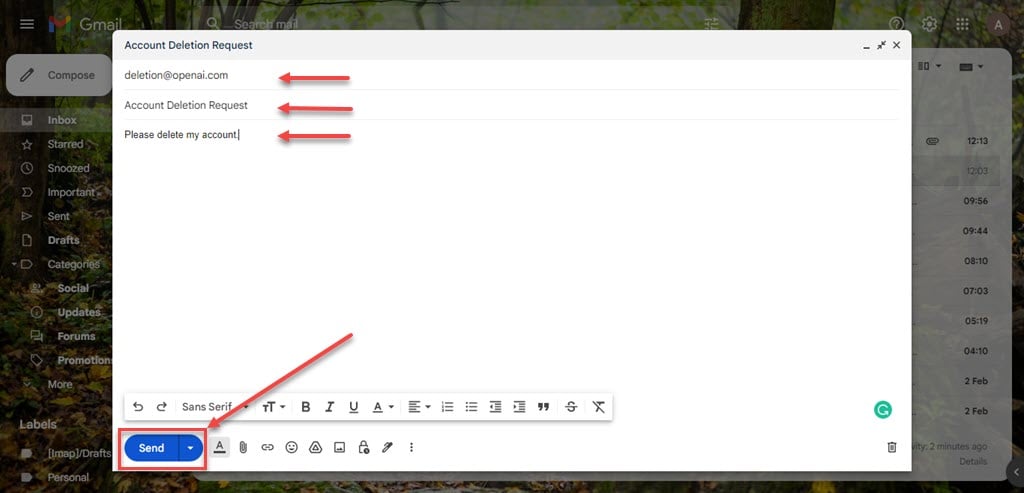
To delete your ChatGPT account through this method you have to send an email to deletion@openai.com.
- Compose a mail and put deletion@openai.com in the recipient.
- Then, type Account Deletion Request in the Subject.
- In the content body type Please delete my account, after that click on the Send button to send the mail.
Once you send the request deletion@openai.com, it cannot be cancelled. So only email if you sure that you want to delete your account.
Also read: How to fix DNS probe started?
Deleting account through help chat
If you want to delete your account using the help chat option of OpenAI then follow the steps below:
Step 1: Log in to your ChatGPT account and then click on the Updates and FAQ option available in the left side panel of the screen.

Step 2: On the next page, click on the Help button present in the bottom right corner of the screen.

Step 3: In the help chatbox, scroll down and click on Send us a message.

Step 4: Now, click on the Other option present in the help chatbox.

Step 5: It will ask you to fill in your email address and the message, type in the email address which you want to delete from ChatGPT and then type Account deletion in the message box.

Step 6: After typing the email address and the message then click on the Send (Arrowhead) button to end the message.

Your request for account deletion will be submitted and it will take around one to two weeks for your request to be completed. You will receive a confirmation when the deletion will be completed and for any further queries customer support will contact you either on your mail or in the chatbox.
Also read: What is Oksms? Is it safe? Top 3 alternatives
Read more about ChatGPT
- Is ChatGPT free?
- ChatGPT FAQs: 15 Talking Points
- How to fix ChatGPT internal server error?
- How to fix ChatGPT network error on long responses?
- What is error in body stream in ChatGPT? 5 Fixes
- How to fix error: ChatGPT is at capacity?
- How to fix ChatGPT redirect error?
- How to check if ChatGPT is down right now?
- Does ChatGPT save data?
- Can you get banned from ChatGPT?
- ChatGPT character limit explained
- How to save ChatGPT conversation?





